Execution Flow and Runtime Lifecycle
This document traces every agent execution from trigger reception through post-run processing -- step by step, service by service. It covers the 9-step runtime flow, complete sequence diagrams, trigger normalization, the approval gate hibernation mechanism, context assembly, real-time telemetry, error recovery, and multi-agent pipeline chaining.
Quick Navigation
Universal Runtime Flow
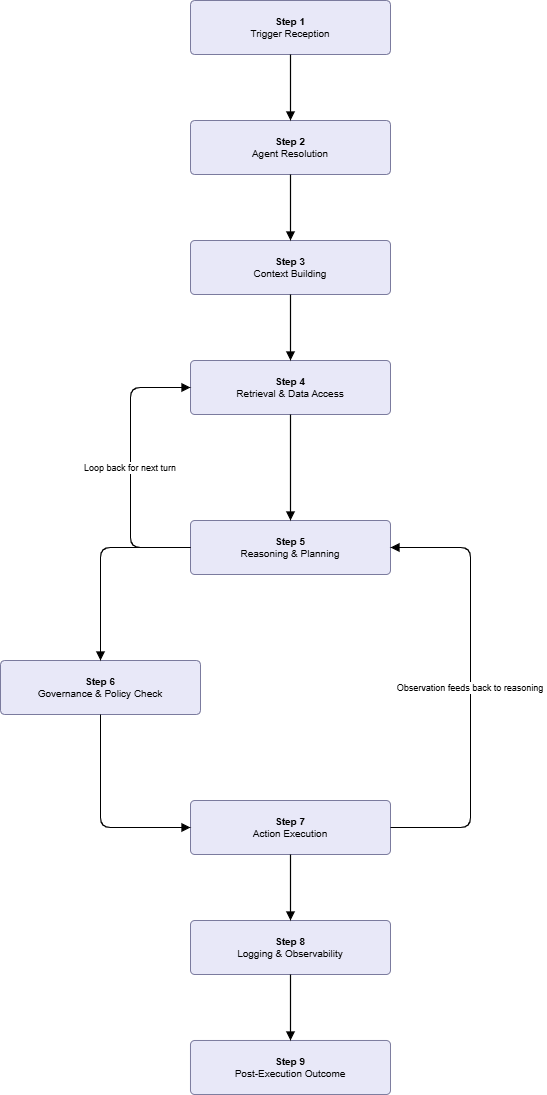
Every agent execution follows these 9 steps regardless of trigger type, agent category, or action level. Steps 5 through 8 repeat per reasoning turn until the agent finalizes or a terminal condition is reached. Step 9 executes exactly once on any terminal transition.
| Step | Name | Owning Service | Key Contract |
|---|---|---|---|
| 1 | Trigger Reception | Trigger Ingestion Service | Normalizes any signal source into a uniform ExecutionRequest schema |
| 2 | Agent Resolution | Agent Management Service | Validates agent is Active; rejects with log if paused, archived, or draft |
| 3 | Context Building | Context Builder | Assembles AgentContext -- instructions, tools, memory, schemas, trigger payload |
| 4 | Retrieval and Data Access | Data Access Service via TLO Gateway | Schema discovery + query execution; ACL validated per call at TLO Gateway |
| 5 | Reasoning and Planning | Reasoning Engine (river-agent :8007) | LLM selects next tool call or emits finalize signal; does not enforce governance |
| 6 | Governance and Policy Check | Governance Service (Backend :8005) | Enforces action_level and org policies before every write tool dispatch |
| 7 | Action Execution | Tool Execution Service via TLO Gateway | Routes approved tool calls to target services; formats result as observation |
| 8 | Logging and Observability | Logging Service + Monitoring Service | Writes per-turn log entry; updates metrics; streams WebSocket event to UI |
| 9 | Post-Execution Outcome | Execution Service + Notification Service | Terminal state write, async memory write-back, health recalculation, notifications |
Reasoning loop bounds: The loop runs a maximum of 15 turns by default, configurable per agent via max_turns. The runner also enforces two additional loop-break conditions independent of the turn counter: no tool calls for 3 consecutive turns (reasoning stall), and the same tool called 3 times with identical arguments (infinite loop detection). Both conditions are evaluated by AgentRunWorkflow, not by the LLM.
Complete Execution Sequence
The following sequence covers a single execution that includes one approval-gated tool call. Non-governed tool calls follow the Fully Automated branch only.
Trigger Ingestion Flow
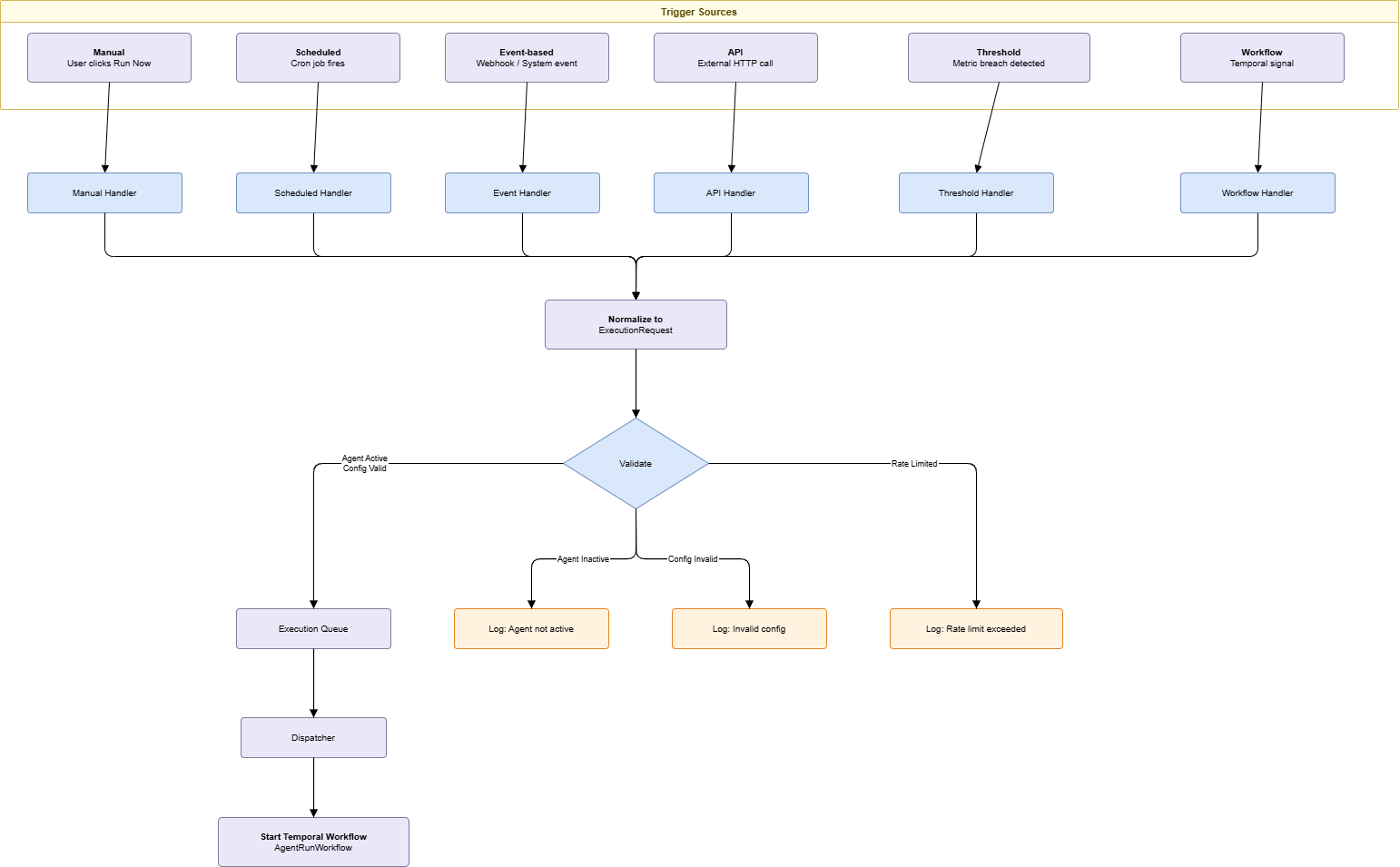
All six trigger types funnel through a common normalization step before the Agent Runner takes control. The ExecutionRequest schema is the interface boundary -- everything upstream of it is trigger-type-specific; everything downstream is uniform.
Trigger-Specific Handler Behavior
| Trigger Type | Handler Logic |
|---|---|
| Manual | Immediate dispatch. requested_by is set to the initiating user ID. Optional payload from the UI form is forwarded in trigger_payload. |
| Scheduled | Scheduler polls scheduled_jobs every 30 seconds. On cron match, creates ExecutionRequest with cron expression context. Handles timezone conversion. Prevents duplicate fires via distributed lock for the scheduled interval. |
| Event | Webhook endpoint receives event payload. Handler matches event type against all registered agent trigger rules. Applies payload condition filters (e.g., only fire if priority = high). A single incoming event may trigger multiple agents in parallel. |
| API | Validates API key against the issuing org. Parses and validates payload against optional JSON schema. Rate limiting enforced per API key at a default configurable per workspace. |
| Threshold | Subscribes to metric stream. Evaluates threshold expression (e.g., cpu_percent > 90 for 5m). Enforces cooldown period after each firing to prevent trigger storms on sustained threshold breaches. |
| Workflow | Listens for Temporal signals from parent workflows. Receives parent workflow context in payload. Enables ordered pipeline chaining: Agent N signals Agent N+1 with its output as the trigger payload. |
Approval Gate Sequence
The approval gate uses Temporal's workflow.await() to pause execution state without consuming compute resources. The full AgentContext is serialized to the database; the Temporal workflow thread suspends. On signal receipt, the thread resumes by deserializing the saved state and continuing from the exact point of interruption.
Approval Gate Implementation Notes
| Aspect | Behavior |
|---|---|
| Context serialization scope | Serialized context includes full conversation history up to the paused turn, the pending tool call and its arguments, and all observations received so far. Stored in AgentExecution.context_snapshot. |
| Edit and Approve semantics | Modified arguments replace the original tool call arguments entirely. The LLM never sees the original arguments again. The observation reflects the modified values so reasoning history remains internally consistent. |
| Approval expiry | ApprovalRequest records that remain PENDING beyond the configured expiry duration are transitioned to EXPIRED. The Temporal workflow receives an approval_resolved (EXPIRED) signal and the run terminates with status approval_expired. |
| Audit on every path | Every approval gate resolution -- approved, rejected, edited, or expired -- emits an audit_logs entry before the Temporal signal is sent. The audit record is the authoritative source of the governance decision; the ApprovalRequest record is the operational state tracker. |
| Approver notification routing | Notification channels (Slack, email, in-app) are configured per workspace in WorkspaceSettings.approval_notification_config. At least one channel must be active for approval-gated agents to deploy. |
Context Building Phase
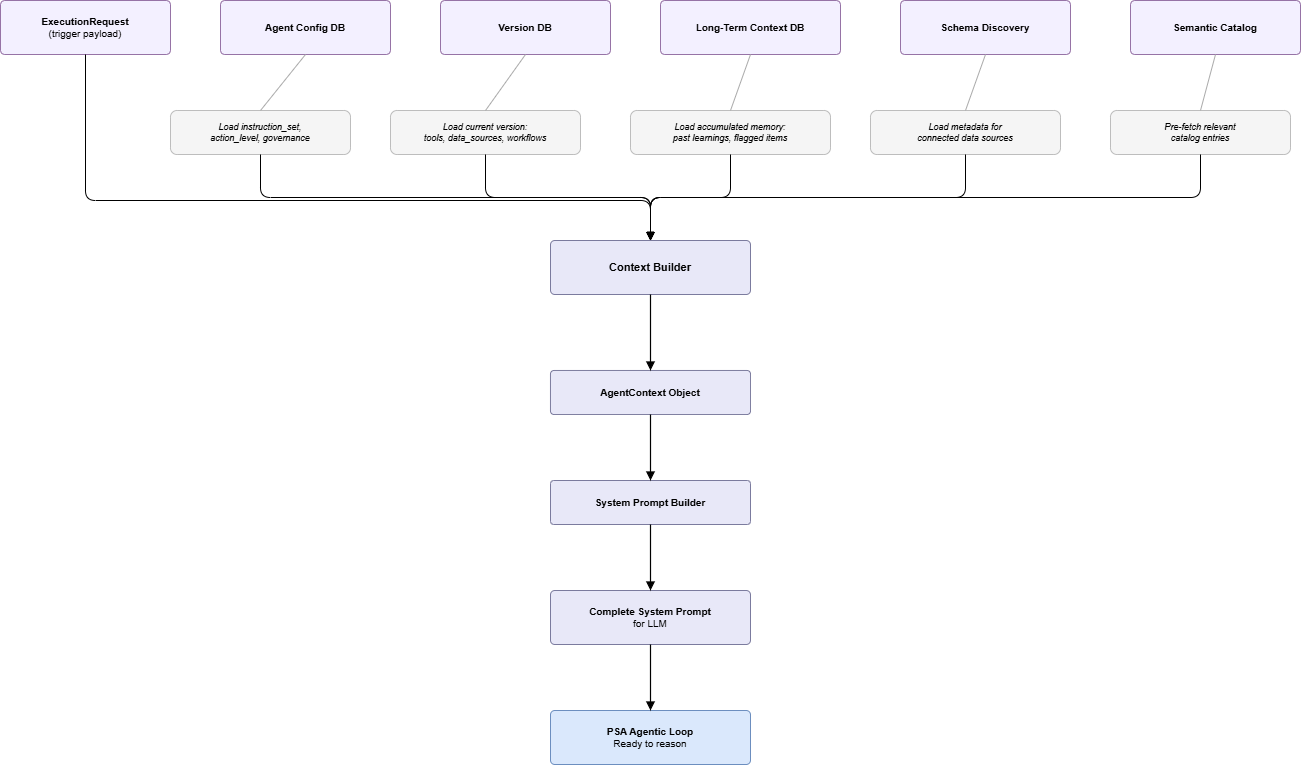
The Context Builder executes once per execution before the reasoning loop starts. Its output -- the AgentContext -- is passed to the System Prompt Builder, which constructs the full LLM prompt for the first reasoning turn. On subsequent turns, only the new observation is appended; the base context is not rebuilt.
AgentContext Composition
| Section | Source | Content |
|---|---|---|
| Identity | Agent record | agent_id, name, business_function, owner_user_id |
| Instructions | Agent version | instruction_set -- the agent's goal expressed in natural language |
| Allowed Tools | Agent version + Tool Registry | Tool names and Pydantic schemas in LLM function-calling format |
| Data Sources | Agent version + Schema Service | data_source_ids with resolved table and column metadata |
| Governance | Agent config + Policy Engine | action_level, approval_rules, active org and workspace policies |
| Memory | Long-term context DB | Accumulated learnings from previous runs (summarized, not raw log entries) |
| Trigger Context | ExecutionRequest | trigger_type, trigger_source, trigger_payload |
| Execution Metadata | Execution record | execution_id, turn_count (starts at 0), start_time |
Schema metadata caching: The Schema Discovery Service caches schema metadata -- it is not fetched live on every execution. The cache is invalidated when a data source connection is updated. Schema changes in a connected database do not propagate automatically; engineers adding new tables to a connected data source must trigger a manual schema refresh from the Data Sources configuration panel.
Memory summarization: Long-term context is stored as summarized learnings, not raw log entries. The summary is generated at the end of each successful run and stored per-agent. This keeps the system prompt within token budget even for agents with hundreds of prior runs.
Real-Time Telemetry Flow
During an active run, the Agent Runner emits WebSocket events after each turn transition. The UI subscribes to the run-specific channel on page load and renders each event incrementally without polling.
WebSocket Event Reference
| Event | Direction | Key Payload Fields | UI Action |
|---|---|---|---|
run_started | Server to Client | execution_id, agent_id, trigger_type, started_at | Open live feed; render run start indicator |
turn_reasoning | Server to Client | turn, thought_summary, model_used | Append reasoning block to activity feed |
tool_called | Server to Client | turn, tool_name, args_summary | Render tool call badge |
observation_received | Server to Client | turn, tool_name, result_summary, duration_ms | Render observation block |
turn_complete | Server to Client | turn, duration_ms | Update per-turn latency metric |
approval_required | Server to Client | approval_id, tool_name, pending_since | Render inline approval card with action controls |
approval_resolved | Server to Client | approval_id, resolution, resolved_by | Update approval card to resolved state |
run_completed | Server to Client | status, duration_ms, turns_used, final_output_summary | Render completion badge; close live feed |
WebSocket authentication: The connection uses a Bearer token passed as a subprotocol header (Sec-WebSocket-Protocol: Bearer <access_token>). The token is validated on the upgrade handshake. The connection is scoped to executions belonging to the authenticated user's workspace -- clients cannot subscribe to runs from other workspaces.
Error Handling and Recovery
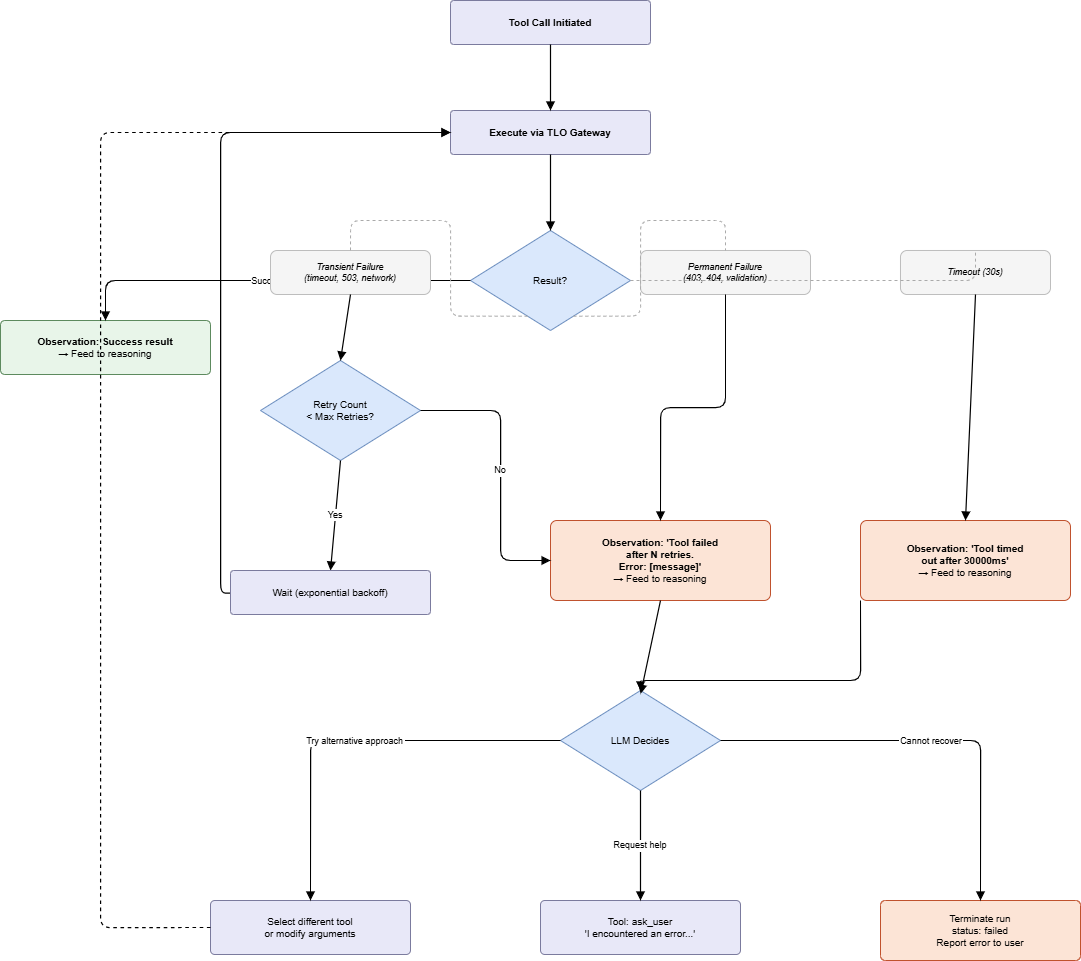
Tool failures return structured error observations to the reasoning engine rather than terminating the execution. The LLM decides whether to retry with different arguments, use an alternative tool, escalate to a human via ask_user, or concede failure. The runner enforces hard limits independently of the LLM decision.
Turn Limit Enforcement
These three conditions are evaluated by AgentRunWorkflow independently of LLM behavior. They are safety rails, not LLM features.
| Condition | Detection | Runner Response |
|---|---|---|
Turn count reaches max_turns (default: 15) | Turn counter incremented per turn by AgentRunWorkflow | Runner requests a final progress summary from river-agent :8007, then terminates. Status: max_turns_exceeded. |
| No tool calls for 3 consecutive turns | Zero tool_call events in 3 sequential responses from river-agent | Runner injects system message: "You appear to be repeating yourself. Please take action or conclude." |
| Same tool called 3 times with identical arguments | SHA hash of (tool_name + serialized_args) compared across turns | Runner forces immediate termination with diagnostic log entry. Status: failed, error code: infinite_tool_loop. |
Timeout separation: The 30-second per-tool timeout is enforced at the TLO Gateway level. The reasoning engine has a separate per-turn LLM inference timeout (default: 120 seconds), configurable via llm_timeout_seconds in the agent's version config. These are independent counters; a slow LLM response and a slow tool call each consume their own timeout budget.
Post-Execution Processing
Post-execution processing triggers on any terminal state transition: completed, failed, max_turns_exceeded, or cancelled. All steps are sequential and synchronous except long-term context write-back, which is non-blocking to avoid delaying status finalization.
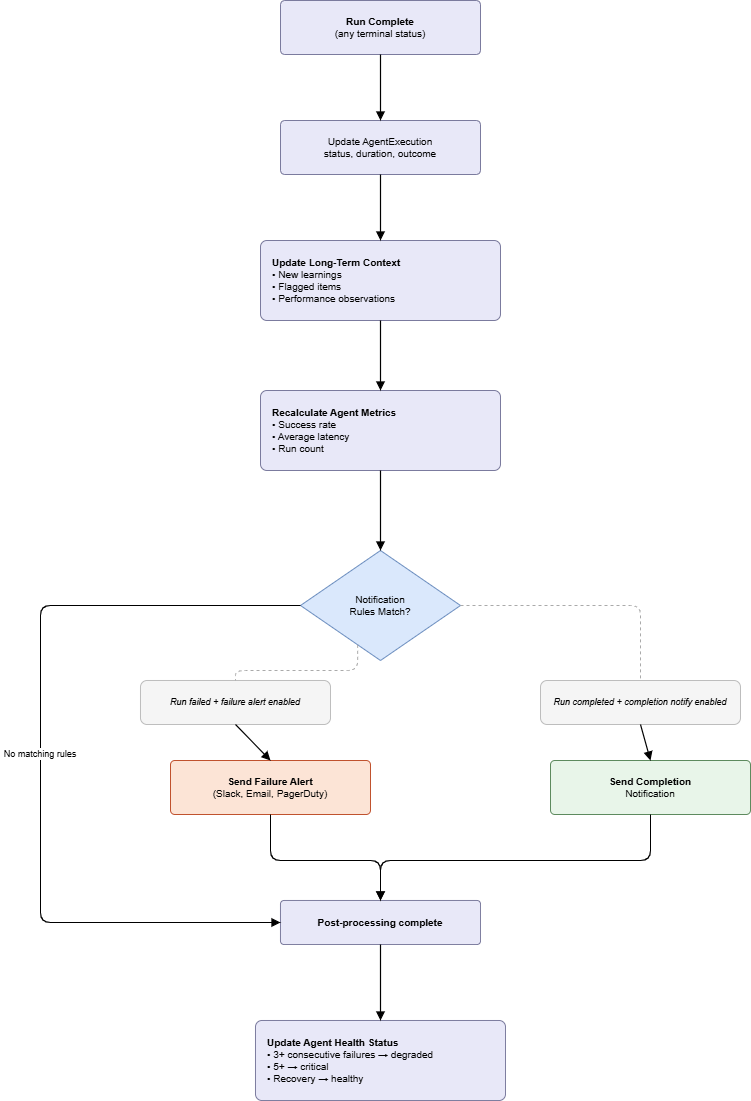
Memory write-back failure handling: The long-term context update is fire-and-forget from the perspective of the AgentExecution record. If the memory write fails, the run status is still marked completed and the failure is logged as a non-fatal error in the execution service log. Memory consistency is best-effort; execution state integrity is not.
Health threshold evaluation: The 3-failure degraded and 5-failure critical thresholds are evaluated against the agent's most recent consecutive run history, not cumulative all-time counts. A single successful run resets the consecutive failure counter. Health status changes emit an audit_logs entry with event_type: agent_health_changed.
Multi-Agent Pipeline Flow
Agents chain using Workflow triggers: one agent emits a Temporal signal on completion, the downstream agent's trigger handler receives it, extracts the output as the trigger payload, and starts a new independent execution. The agents do not communicate directly -- the Temporal signal is the only coupling between pipeline stages.
Pipeline Design Constraints
| Concern | Behavior |
|---|---|
| Signal durability | Temporal signals are durable. If the downstream agent's workflow has not started yet when the signal arrives, the signal is buffered until the workflow is ready. No data is lost on transient delays. |
| Error propagation | Pipeline stages are independent executions. A failure in Agent 2 does not automatically fail Agent 3 -- Agent 3 simply never receives its trigger signal. Downstream pipeline stages must be monitored independently. |
| Action level variation | Each pipeline stage can have a different action level. An approval gate in Agent 2 pauses that stage's execution but does not affect Agent 1's already-completed status. |
| Payload size limit | The Temporal signal carries a reference (e.g., MinIO path or execution_id), not the raw data. Agents that need the actual dataset fetch it from the referenced location during their data access step (Step 4). Large data must never be embedded directly in the signal payload. |
| Cycle prevention | Circular pipeline references -- Agent A signals Agent B which signals Agent A -- are not automatically detected at configuration time. Engineers designing pipelines are responsible for ensuring acyclicity. A circular pipeline will consume execution budget indefinitely until budget exhaustion or manual cancellation. |