System Overview
Engineering reference for the River Agents platform: three-service architecture, four action levels, six trigger types, nine lifecycle states, agent configuration model, and component integration contracts.
Quick Navigation
Architecture Overview
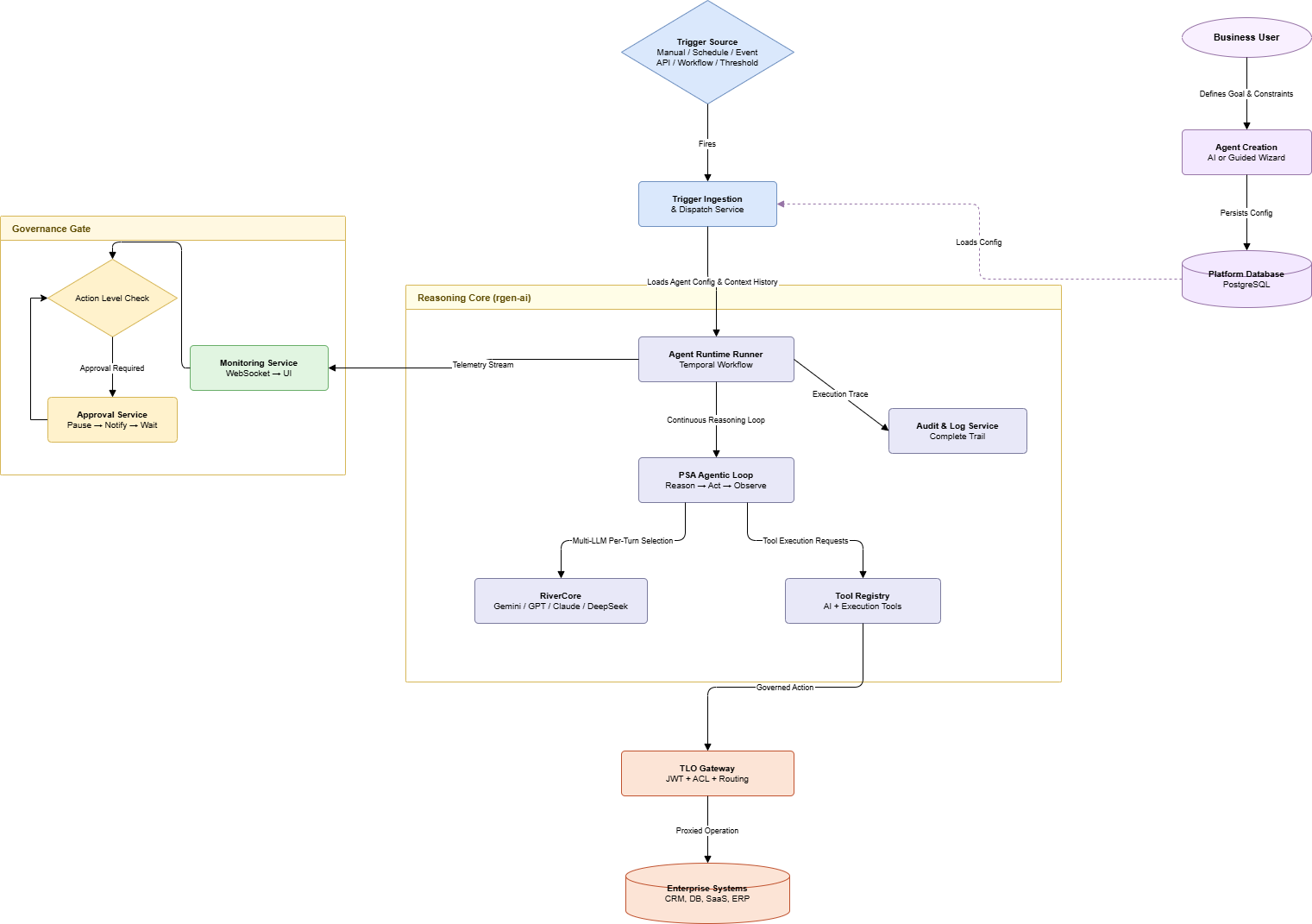
River Agents is a three-service platform. Every execution crosses all three services in sequence.
| Service | Port | Responsibility |
|---|---|---|
| Backend (FastAPI) | :8005 | Agent CRUD, lifecycle state machine, trigger registration, approval processing, audit writes |
| TLO Gateway | :8001 | JWT validation, per-tool ACL enforcement, route proxying to Backend and river-agent |
| river-agent (FastAPI) | :8007 | Stateless reasoning service -- runs the full agentic loop per execution request |
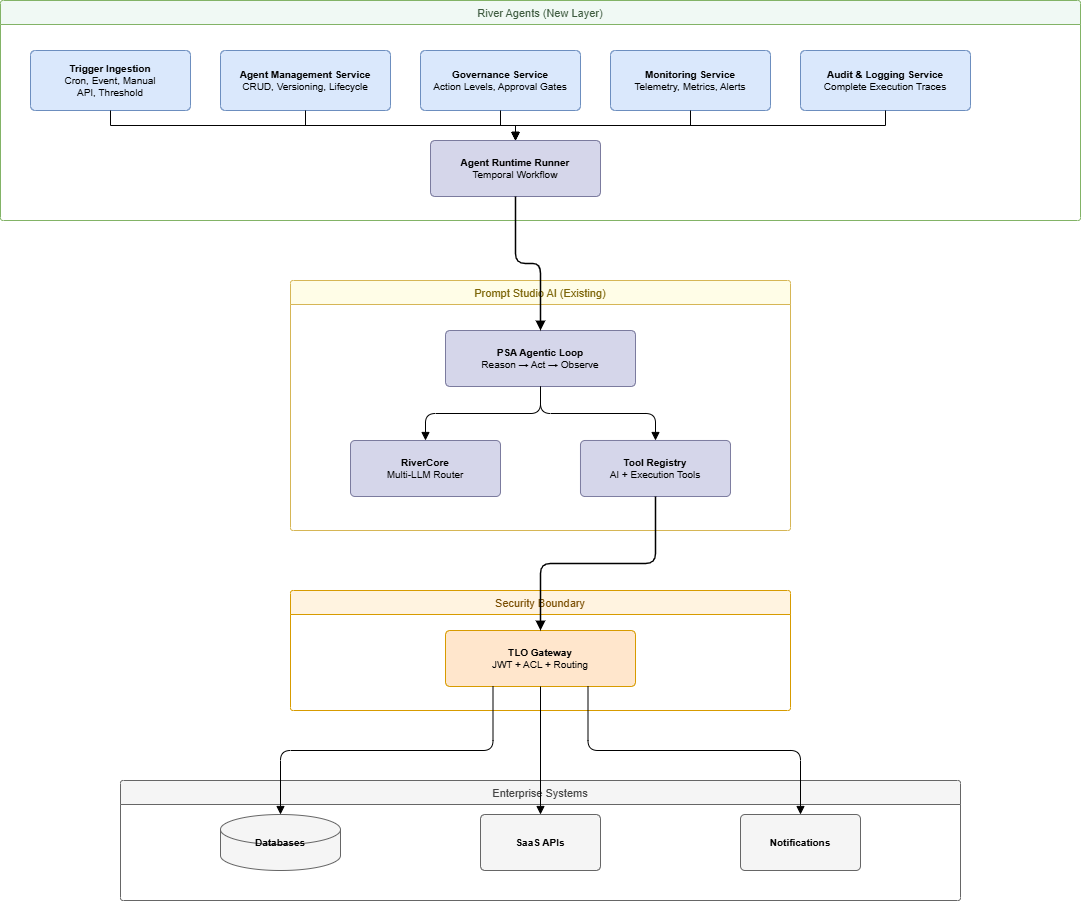
The Backend owns all persistent state (PostgreSQL river_agents schema) and is the only process that writes to it. TLO Gateway is the single security boundary for all external-facing API calls and all tool dispatch. river-agent is entirely stateless -- it receives the full AgentContext in the request body and returns a complete ReasoningResult; it holds no database connections and no in-memory session state.
River Agents layers the following on top of the core reasoning engine: persistent agent identity with immutable version snapshots, six trigger types handled by a normalization layer, a 9-state lifecycle state machine with guarded transitions, long-term memory accumulated across runs in agent_memory, approval gate orchestration via Temporal workflow.await(), governance policy evaluation on every write-capable action, and a real-time observability surface via WebSocket and agent_metrics.
The Action Level Enforcement Model
Action levels are the primary governance control for every deployed agent. They are not a hint to the LLM -- they are an enforcement boundary in the execution infrastructure.
| Level | Name | Enforcement Behavior |
|---|---|---|
| 1 | Read and Respond | Tool registry presented to river-agent contains only read-classified tools. No write-capable tool is dispatched. |
| 2 | Recommend Actions | Write-capable tools are available for reasoning and planning but blocked at dispatch. TLO returns a staged proposal instead of executing. |
| 3 | Act with Approval | Write-capable tools are dispatched only after an approval record is resolved. Temporal workflow serializes state at the gate. |
| 4 | Fully Automated | All tools in the agent's configured tool set are dispatched without gates. ACL still enforces the outer boundary. |
The enforcement chain for a tool call is:
- river-agent selects a tool via the agentic loop reasoning step
- river-agent sends the tool call to Backend :8005
- Backend checks the agent's
action_levelagainst the tool's write classification - If the level requires a gate, Backend creates an
approval_requestsrecord and signals Temporal to suspend viaworkflow.await() - On approval resolution, Temporal resumes; Backend re-submits the tool call to TLO Gateway
- TLO validates the per-tool ACL before dispatching to the target service
The LLM never bypasses this chain. Even if river-agent reasons toward a write action that the action level disallows, the enforcement happens downstream of the reasoning output.
Risk profile by level:
| Level | Risk | Deployment Requirement |
|---|---|---|
| 1 | None | Safe for any user and any data source |
| 2 | Low | Requires a human operator available to review proposals |
| 3 | Medium | Requires configured approver assignment and notification routing |
| 4 | High | Requires a validated instruction set, scoped tool list, and active monitoring before activation |
Trigger Architecture
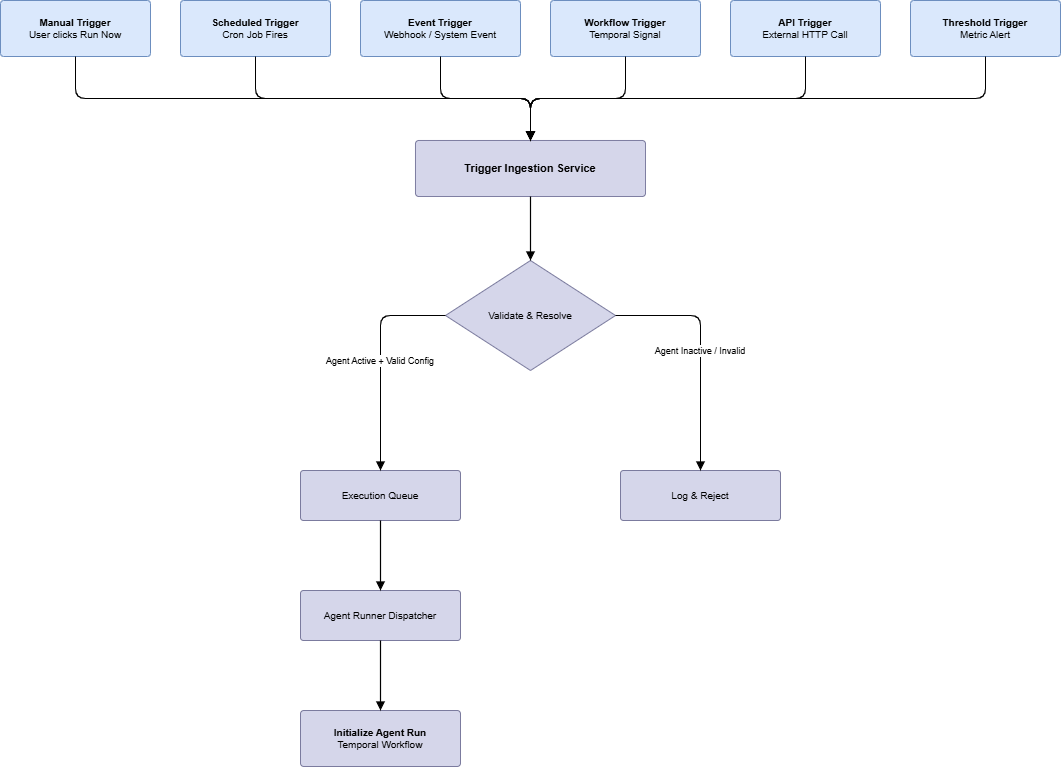
Six trigger types feed into the same Trigger Ingestion Service. The ingestion service normalizes each trigger into a standard envelope and routes it to the Execution Queue. The Agent Runner Dispatcher pulls from this queue and initiates a Temporal workflow per run.
| Trigger Type | Ingestion Mechanism | Key Configuration Fields |
|---|---|---|
| Manual | POST to /api/v1/agents/:id/runs | None required |
| Scheduled | Internal cron scheduler reads trigger_config.cron_expression | cron_expression (e.g., 0 8 * * *), timezone |
| Event-based | Kafka consumer or webhook endpoint | event_type, optional payload_conditions |
| Workflow | Temporal signal listener | workflow_id, signal_name |
| API | External POST to agent's dedicated endpoint via TLO | api_key, optional payload_schema |
| Threshold / Policy | Metric monitor polls configured metric source | metric_source, threshold_expression, cooldown_seconds |
The trigger ingestion service performs two checks before enqueuing:
- Agent state check -- agent must be in
activestatus. Any other state results in the trigger being logged and rejected. - Concurrency check -- if
allow_concurrent_runsis false (default), a trigger arriving while a run is already inrunningstatus is queued or dropped based on theon_concurrent_triggerpolicy (queue,drop, orreplace).
Agent Lifecycle State Machine
Agent state is stored in river_agents.agents.status and transitions are enforced by the Agent Management Service. No component other than the Backend service may write to this field.
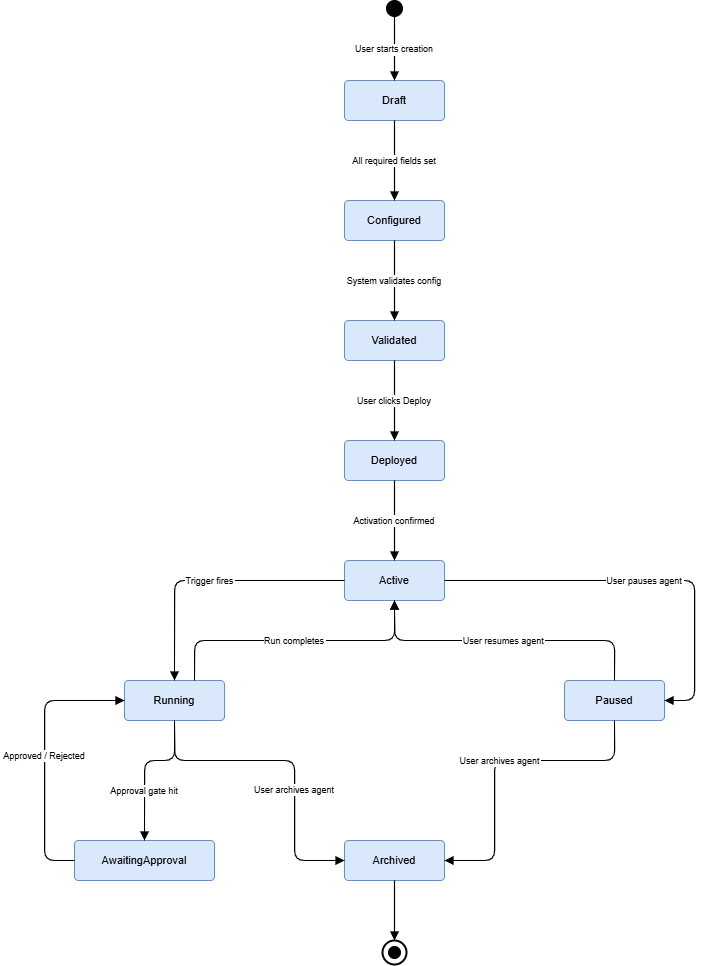
Transition guards and enforcement:
| Transition | Guard | Enforced By |
|---|---|---|
| Configured -> Validated | Data source connectivity test passes; all bound tools exist in registry; governance policy resolves | Agent Management Service (validation job) |
| Validated -> Deployed | Temporal workflow registered; trigger listeners activated | Agent Management Service + Trigger Ingestion Service |
| Active -> Running | Trigger ingested; concurrency check passes; rate limit not exceeded | Trigger Ingestion Service + Agent Runner Dispatcher |
| Running -> Awaiting Approval | Tool call classified as requiring approval at current action_level | Backend governance check during execution |
| Any state -> Archived | Caller has agent:delete permission; running executions must be cancelled first | Agent Management Service (permission check) |
Validation (Configured -> Validated) is the only transition that runs asynchronous checks. All other transitions are synchronous state writes with guard evaluation inline.
Agent Categories: Technical Reference
Eight categories are supported. Categories are a classification tag (business_function enum) that determines the default template, recommended tool set, and default action level applied at creation time. Category does not change runtime behavior -- action level and tool bindings are what the runtime enforces.
| Category | business_function Value | Default action_level | Typical Write Operations | Primary Trigger |
|---|---|---|---|---|
| Customer Support | customer_support | act_with_approval | Send response, issue refund, create escalation ticket | Event (ticket.created) |
| Sales and Lead Qualification | sales | recommend | CRM record update | Event (lead.created) |
| Finance and Reconciliation | finance | act_with_approval | Ledger write-back | Scheduled (daily) |
| Risk and Compliance | risk_compliance | act_with_approval | Access revocation, case creation | Event + Threshold |
| Data Analyst and Insights | data_analyst | read_only | None | Manual + Scheduled |
| Operations Monitoring | operations | automated | Workflow restart, infrastructure scaling | Threshold + Event |
| Executive Decision Support | executive | read_only | None | Scheduled |
| Custom Enterprise | custom | Configurable | Configurable | Configurable |
The defaults are applied at agent creation time as pre-populated values. Operators may override any of them. The Operations Monitoring category ships with fully_automated as its default because time-critical remediation actions (restarting a failed workflow, scaling a service) lose their value if blocked by an approval gate. This is the only category where fully_automated is the recommended starting point -- and it requires the most careful tool scoping before activation.
Agent Configuration Schema
The river_agents.agents table stores the root entity. The canonical object model covers all configurable and system-managed fields.
| Field | Type | Description |
|---|---|---|
agent_id | UUID | Immutable identifier generated at creation |
name | string | Human-readable identifier used in logs, notifications, and the UI |
description | text | Free-text description of the agent's purpose; not used by the reasoning engine |
business_function | enum | Category classification; determines default template and recommended tools |
domain | string | Business domain tag used for grouping and filtering in the UI (e.g., "Revenue Operations") |
owner_user_id | UUID | Foreign key to iam.users; receives approval notifications and is the default approver |
status | enum | Current lifecycle state; written only by Agent Management Service |
action_level | enum | Autonomy ceiling enforced at the Backend governance layer, not by the LLM |
governance_level | enum | Policy strictness preset: standard, strict, custom |
instruction_set | text | Natural language goal and behavioral constraints passed to river-agent as the system prompt component |
selected_data_sources | array[UUID] | Foreign keys to platform.data_sources; scopes what the agent may query |
selected_tools | array[string] | Tool identifiers from the tool registry; defines what the agent may invoke |
selected_workflows | array[UUID] | Temporal workflow IDs the agent may trigger as sub-processes |
trigger_config | JSONB | Type-discriminated union; deserialized by trigger type at ingestion time |
approval_rules | JSONB | Approver assignment, auto-approve conditions, and escalation timeout (seconds) |
notification_config | JSONB | Channel config (Slack webhook, email, in-app) and the event types that trigger each |
long_term_context | JSONB | Accumulated memory written back by Backend after each run; read by river-agent during context assembly |
current_version_id | integer | Points to the active agent_versions record; pinned on deploy, updated on version rollout |
health_status | enum | Computed by Monitoring Service from recent execution outcomes: healthy, degraded, critical, unknown |
created_at | timestamptz | Set at INSERT; never updated |
updated_at | timestamptz | Updated on every configuration change |
organization_id | UUID | Tenant isolation key; all queries against agent tables must include this filter |
workspace_id | UUID | Workspace scope within the organization |
Implementation notes on key fields:
instruction_setis injected into the river-agent context bundle as a system-level prompt segment, separate from the trigger payload. river-agent sees both.trigger_configuses atypediscriminator field. The trigger ingestion service switches on this field to determine the deserializer. Unknowntypevalues cause the trigger registration to fail at validation time, not at ingestion time.long_term_contextis not a free-form log. The Backend writes a structured delta after each run. river-agent reads the full snapshot on context assembly. The schema for this JSONB is documented in the Schema Design section.action_levelis checked by the Backend, not by river-agent. river-agent has no knowledge of the action level -- it receives a tool registry that may or may not include write-capable tools, depending on what Backend decided to pass.
Component Interaction Model
The sequence below covers a standard execution run at action_level 3 (Act with Approval) to illustrate all service interactions.
Platform Integration Points
River Agents consume the following RiverGen platform components. Each integration point is a hard dependency -- the component must be available for the described functionality to work.
| Component | Integration Point | What Breaks Without It |
|---|---|---|
| Reasoning engine (river-agent :8007) | Context bundle POST for every agent run | All executions fail; no reasoning is possible |
| TLO Gateway :8001 | Tool dispatch, JWT validation, ACL enforcement | No tools can be invoked; no external actions |
| Temporal.io | Workflow orchestration, workflow.await() for approval gates, retry and timeout handling | Approval gates become synchronous (blocking); retry policies are lost; no durable execution |
PostgreSQL (river_agents schema) | Agent state, version history, execution records, audit log, approval requests | All state is lost; platform cannot function |
| Redis | Agent context caching, session state, rate limiting | Performance degrades; rate limiting is bypassed |
| Qdrant | Semantic search in tool calls, knowledge base retrieval for support/analyst agents | Knowledge retrieval tools fail; affects customer support and data analyst categories |
| Novu | Approval request notifications, agent alert delivery | Approvers are not notified; approval gates time out |
| MinIO | Report and export artifact storage for analyst and executive categories | Report generation tools fail; artifacts cannot be stored |
| WebSocket (via TLO) | Live execution feed consumed by the Run Detail UI | Live log view is unavailable; executions still complete |
Key Architectural Decisions
These are the non-obvious decisions made during the design of River Agents. Understanding the rationale helps when evaluating changes or debugging edge cases.
river-agent is stateless by design
All state -- agent configuration, persistent memory, execution context -- lives in PostgreSQL and is assembled by the Backend before each call to river-agent. river-agent receives a complete context bundle and returns a complete reasoning result. This means river-agent scales horizontally with no coordination overhead and can be restarted at any point without affecting in-flight executions (Temporal handles re-delivery).
Action levels are enforced downstream of the reasoning output
The LLM cannot be trusted to self-enforce autonomy boundaries. If river-agent reasons toward a write action that the action level disallows, the enforcement happens in the Backend governance layer and TLO Gateway ACL check -- not in the prompt. This means governance is not prompt-engineering. A compromised or hallucinating model cannot bypass the action level by reasoning around a restriction in the instruction set.
Temporal is used for approval hibernation, not a custom wait loop
When an approval gate is triggered, the Temporal workflow suspends via workflow.await(). There is no polling, no scheduled job checking for resolution, and no in-memory state that could be lost on a Backend restart. The workflow resumes only when an explicit signal is sent from the Backend on approval resolution. This makes approval gates durable across restarts, arbitrarily long-lived, and zero-cost in terms of compute during the wait.
TLO Gateway is the single security boundary for all tool dispatch
Neither river-agent nor the Backend dispatches tool calls directly to external systems. All tool invocations pass through TLO Gateway, which re-validates the per-tool ACL at dispatch time using the propagated JWT context. This means ACL changes take effect immediately on the next tool call, even within a running execution. It also means no internal service can execute a tool by bypassing TLO.
Versioning is immutable
Once an agent version is deployed, its configuration snapshot in agent_versions is write-locked. Any configuration change on a deployed agent creates a new version. This ensures that the exact configuration that produced any execution can be retrieved from the audit trail -- the agent_version_id on every agent_executions record is a stable pointer to the full configuration at run time. Rollback is a version promotion, not a revert.