Storage Service
The Storage Service manages file storage, quota tracking, vector storage, caching, and model artifacts using MinIO/S3-compatible storage.
Quick Navigation
Overview
The Storage Service provides:
- File upload, download, and management with presigned URLs
- Storage quota tracking and enforcement
- Vector storage for embeddings and semantic search
- Caching layer for query results and temporary data
- Lifecycle management (warm/cold storage transitions)
- Model registry for ML model artifacts
Service Architecture Flow Diagram
View Flow Diagram
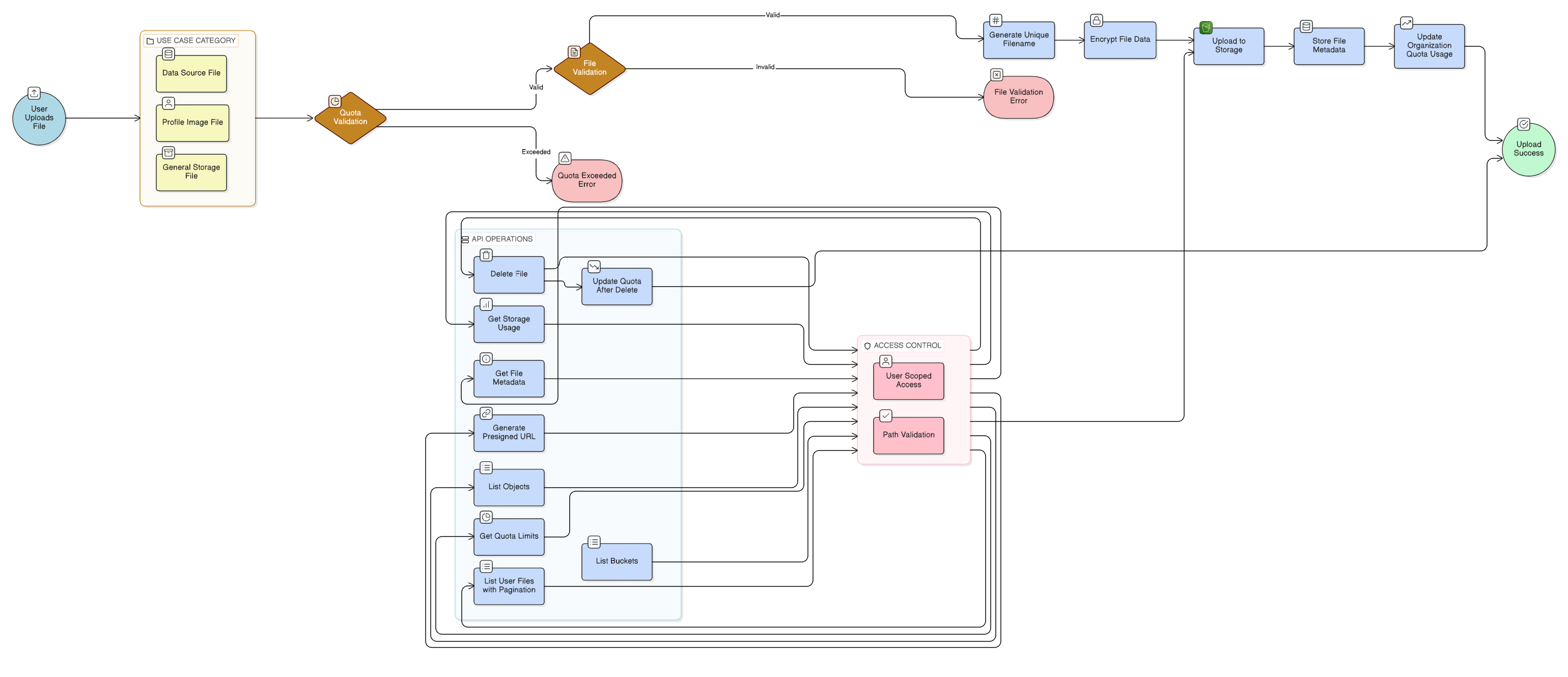
Storage Service Flow Overview:
This flow diagram illustrates the complete storage service workflow from file upload through quota management and lifecycle operations. It demonstrates how files are validated, encrypted, uploaded to storage, and tracked for quota management and access control.
Key Flow Components:
- Quota Validation: System checks organization storage quota before accepting file uploads
- File Validation: Validates file type, size, and format to ensure compatibility
- Unique Filename Generation: Automatically generates unique filenames using timestamps and UUIDs to prevent overwrites
- File Encryption: Encrypts file data before storage for security
- S3/MinIO Upload: Uploads encrypted files to object storage with proper organization and user scoping
- Metadata Storage: Stores file metadata including size, content type, upload timestamp, and file path
- Quota Tracking: Updates organization quota usage after successful uploads
- Use Case Routing: Files can be used for data sources, profile images, or general storage
Base Path
All endpoints are prefixed with /api/v1/storage for public APIs or /internal for internal APIs.
Base URL: http://storage-service:8002 (internal) or http://localhost:8002 (development)
Authentication
The service uses header-based authentication:
X-Org-ID: <organization_id> (required, defaults to 1)
X-User-ID: <user_id> (optional)
Endpoints
Files - Public API
| Method | Endpoint | Description |
|---|---|---|
| POST | /api/v1/storage/files | Upload a file |
| GET | /api/v1/storage/files | List files |
| GET | /api/v1/storage/files/{file_id} | Get file metadata |
| GET | /api/v1/storage/files/{file_id}/url | Get presigned download URL |
| DELETE | /api/v1/storage/files/{file_id} | Delete a file (soft delete) |
Quota - Public API
| Method | Endpoint | Description |
|---|---|---|
| GET | /api/v1/storage/quota | Get storage quota and usage |
| GET | /api/v1/storage/quota/check | Check if file upload is allowed |
Vectors - Internal API
| Method | Endpoint | Description |
|---|---|---|
| POST | /internal/vectors/{ds_id} | Create vector index for a data source |
| POST | /internal/vectors/{ds_id}/search | Search vectors by text |
| DELETE | /internal/vectors/{ds_id} | Delete vector index |
Files - Internal API
| Method | Endpoint | Description |
|---|---|---|
| POST | /internal/files | Internal file upload (service-to-service) |
| GET | /internal/files/{path} | Internal file download (service-to-service) |
Cache - Internal API
| Method | Endpoint | Description |
|---|---|---|
| PUT | /internal/cache/{key} | Store data in cache |
| GET | /internal/cache/{key} | Retrieve cached data |
| DELETE | /internal/cache/{key} | Delete cache entry |
Lifecycle - Internal API
| Method | Endpoint | Description |
|---|---|---|
| POST | /internal/lifecycle/transition | Execute storage tier transitions |
| POST | /internal/lifecycle/cleanup | Remove expired files |
| GET | /internal/lifecycle/status | Get lifecycle status summary |
Model Registry - Public API
| Method | Endpoint | Description |
|---|---|---|
| POST | /api/v1/models/{model_id}/artifacts | Upload a model artifact |
| GET | /api/v1/models/{model_id}/versions | List model versions |
| GET | /api/v1/models/{model_id}/artifacts/{version} | List artifacts for a model version |
| GET | /api/v1/models/{model_id}/artifacts/{version}/{file_name}/url | Get presigned download URL for model artifact |
Total: 22 endpoints
Internal Notes
- Uses MinIO/S3-compatible storage backend
- Supports multiple file categories (user uploads, data sources, models, etc.)
- Quota enforcement prevents exceeding organization limits
- Presigned URLs are valid for configurable expiration (default 1 hour, max 24 hours)
- Vector storage supports semantic search for catalog
- Cache uses S3 with TTL-based expiration
- Lifecycle management moves files between warm/cold storage tiers
- All endpoints are fully implemented