overview
Storage API
Quick Navigation
The Storage API handles file storage operations for MinIO/S3, including file uploads, downloads, metadata management, and quota tracking.
Account Type & Use Case
Shared Endpoint
Storage APIs enable both Individual and Organization account users to upload, manage, and access files securely. Individual accounts use these endpoints within their personal organization, with files stored in user-specific folders and quota limits based on the Individual Plan. Organization accounts use the same endpoints but with organization-wide quota limits and the ability to share files across team members. Files are always user-scoped (users can only access their own files), but Organization accounts have higher quota limits and can use files across multiple workspaces.
Overview
This module provides:
- File upload and download
- Bucket and object management
- Presigned URL generation
- Storage quota management
- File metadata tracking
- User-scoped file access
- File categorization (data_source, profile_image, general)
Storage Flow
The Storage API handles the complete file upload and management workflow, from quota validation through secure storage and metadata tracking. The flow ensures files are properly validated, encrypted, stored securely, and tracked for quota management and access control.
Storage Flow Diagram
View Flow Diagram
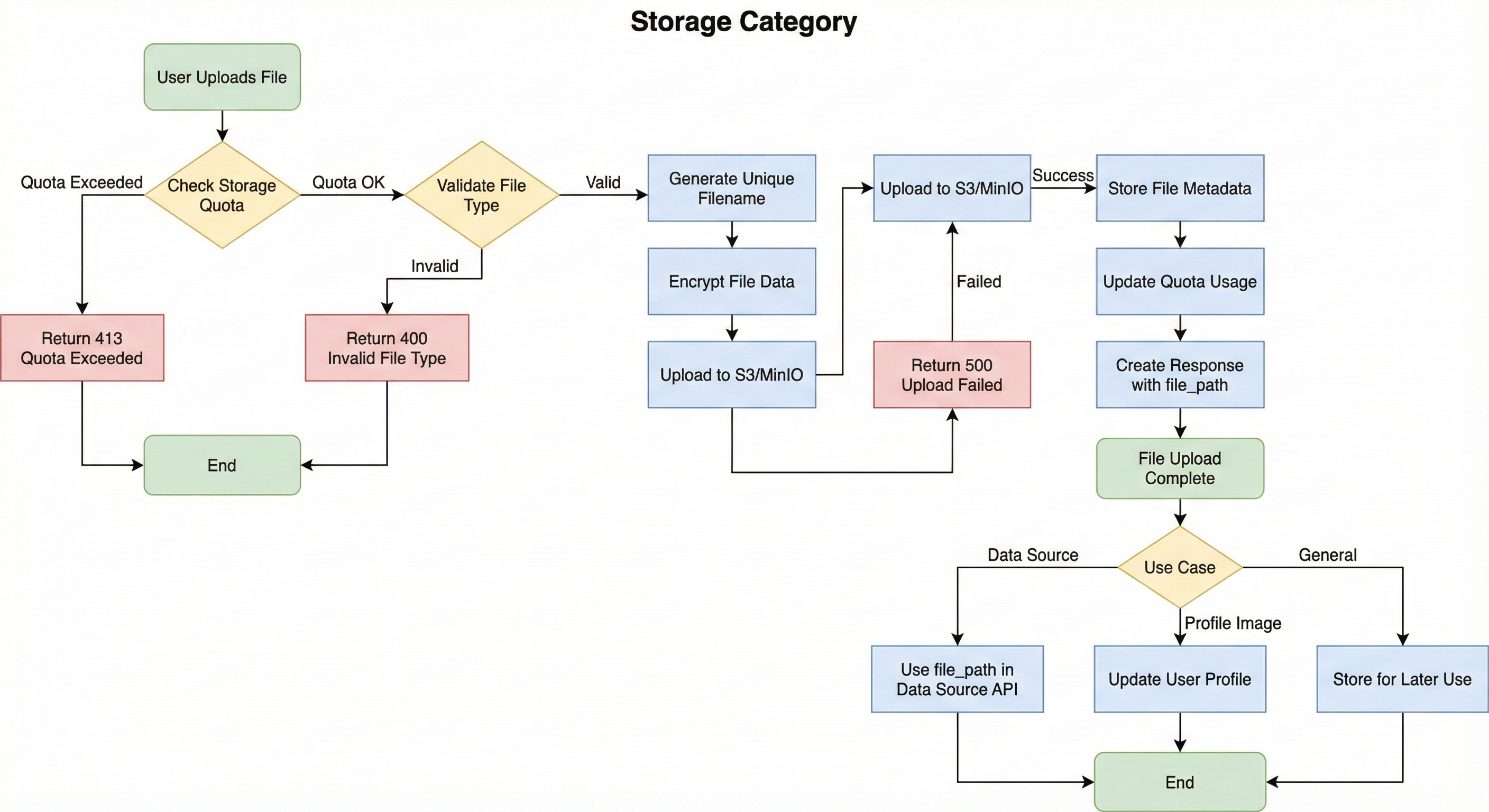
Storage Flow Overview:
This flow diagram illustrates the file upload and management workflow. It demonstrates how files are validated, encrypted, uploaded to storage, and tracked for quota management and access control.
Key Flow Components:
- Quota Validation: System checks organization storage quota before accepting file uploads
- File Validation: Validates file type, size, and format to ensure compatibility
- Unique Filename Generation: Automatically generates unique filenames using timestamps and UUIDs to prevent overwrites
- File Encryption: Encrypts file data before storage for security
- S3/MinIO Upload: Uploads encrypted files to object storage with proper organization and user scoping
- Metadata Storage: Stores file metadata including size, content type, upload timestamp, and file path
- Quota Tracking: Updates organization quota usage after successful uploads
- Use Case Routing: Files can be used for data sources, profile images, or general storage
Internal Developer Notes:
- Quota checking prevents exceeding organization limits before upload begins
- Unique filenames use format:
{original_name}_{YYYYMMDD_HHMMSS}_{uuid8}.{ext} - Files are stored in hierarchical structure:
organizations/{org_id}/files/{user_id}/{filename} - User-scoped access ensures users can only access their own files
- File deletion automatically updates quota usage
- Presigned URLs are generated for secure file access with configurable expiration
Base Path
All storage endpoints are prefixed with /api/v1/storage
Authentication
All endpoints require authentication:
Authorization: Bearer <access_token>
File Organization
Files are organized in the following structure:
organizations/{organization_id}/files/{user_id}/{unique_filename}
- Each user has their own folder within their organization
- Files are automatically assigned unique filenames (timestamp + UUID)
- Original filenames are preserved for display
Storage Quota
- Quota checking before file upload
- Organization-based quota limits
- Automatic quota tracking
- Quota recalculation option
- Quota limits based on organization plan
Security
- Users can only access files under their own folder:
organizations/{org_id}/files/{user_id}/ - Path validation prevents directory traversal
- Presigned URLs with configurable expiration
- Organization-scoped access control
Endpoints
| Method | Endpoint | Description |
|---|---|---|
| GET | /buckets | List all available buckets |
| GET | /buckets/{bucket_name}/objects | List objects in a bucket (user's files only) |
| GET | /files | List user's uploaded files with pagination |
| POST | /upload | Upload a file with quota checking |
| GET | /objects/{object_name}/metadata | Get file metadata |
| GET | /objects/{object_name}/presigned-url | Get presigned URL for file access |
| DELETE | /objects/{object_name} | Delete a file |
| GET | /usage | Get storage usage and quota |
| GET | /quota | Get storage quota limits |
Internal Notes
- All endpoints are fully implemented
- Files are stored in MinIO/S3-compatible storage
- Unique filenames prevent overwrites (timestamp + UUID)
- Quota checking prevents exceeding limits
- File deletion updates quota automatically
- User-scoped access (users can only access their own files)
- File categories:
data_source,profile_image,general
Swagger Documentation
Interactive API documentation available at: /docs#/storage