Authentication API
The Authentication API handles user registration, login, password management, social login, and profile operations. This API is available to both individual and organization accounts.
Quick Navigation
Overview
This module provides comprehensive authentication capabilities including:
- Email/password authentication
- Social OAuth login (GitHub, Google, Apple, Microsoft)
- Multi-factor authentication integration
- Password reset and change
- Profile management
- Email verification
- Session management
Base Path
All authentication endpoints are prefixed with /api/v1/auth
Authentication
Most endpoints require a valid JWT access token obtained from the login endpoint:
Authorization: Bearer <access_token>
Authentication Flow
The authentication system implements a multi-layered security approach with sequential validation checks, rate limiting, email verification, and optional MFA integration. The flow ensures secure user authentication while maintaining a smooth user experience for trusted devices.
Authentication Flow Diagram
View Flow Diagram
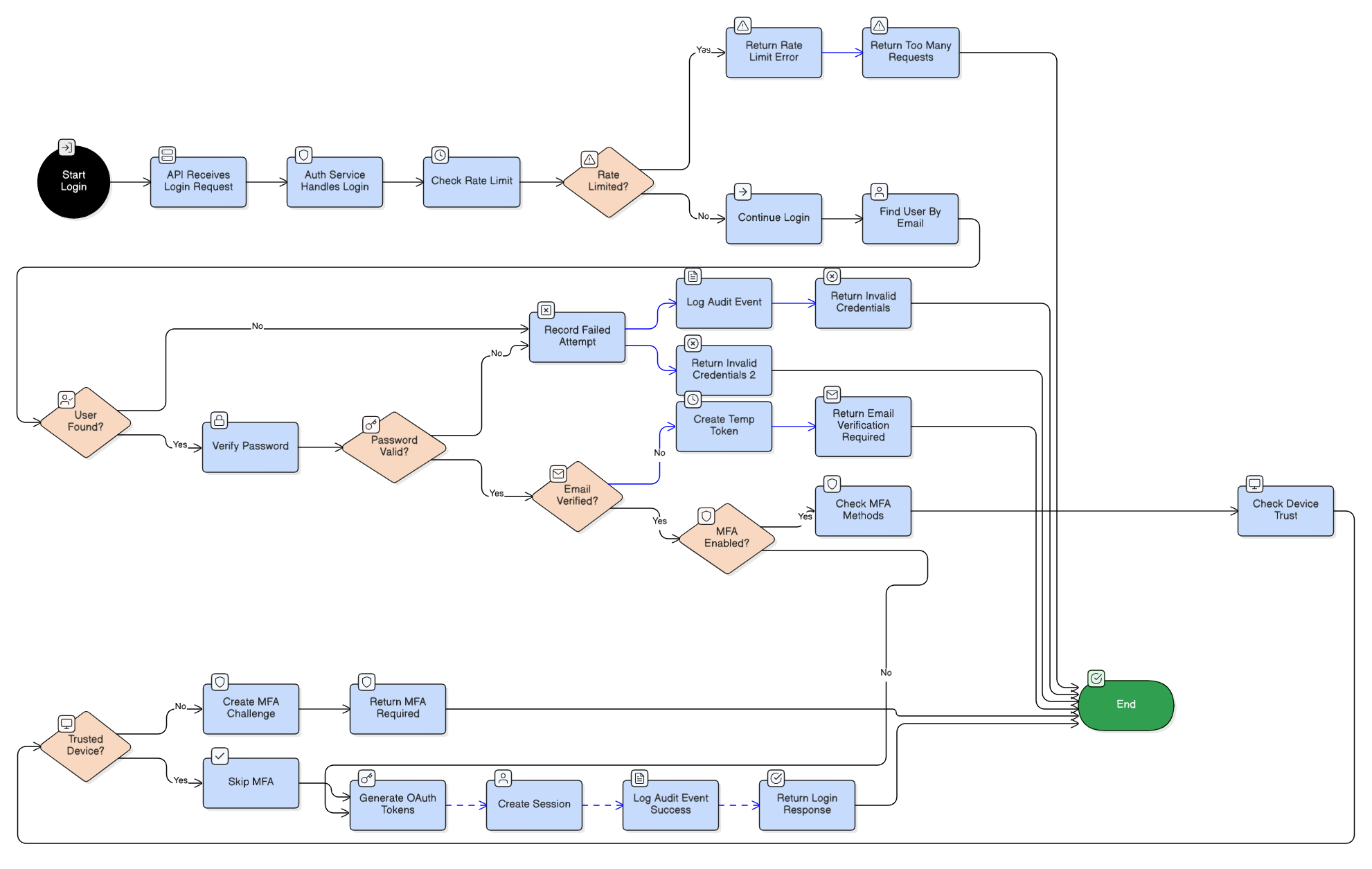
Flow Chart Overview:
The flow chart diagram provides a high-level visual representation of the authentication decision tree. It illustrates the complete authentication workflow from initial login request through various validation and security checks.
Key Flow Components:
- Initial Request: Client submits credentials (email and password) to the authentication endpoint
- Rate Limiting Check: First security layer validates request frequency to prevent brute-force attacks
- User Validation: System verifies user exists and account is active
- Credential Verification: Password is validated against stored hash using bcrypt
- Email Verification Check: Ensures user's email address has been verified before allowing full access
- MFA Evaluation: Checks if Multi-Factor Authentication is enabled for the account
- Device Trust Check: For MFA-enabled accounts, verifies if the device is trusted to bypass MFA challenge
- Token Generation: Upon successful validation, generates JWT access and refresh tokens
- Session Creation: Creates a new session record in the database
- Audit Logging: Records all authentication events for security monitoring
Internal Developer Notes:
- Rate limiting is enforced at the Redis layer with configurable thresholds (default: 5 attempts per 15 minutes per IP)
- Failed authentication attempts are logged in both Redis (for rate limiting) and Database (for audit trail)
- Temporary tokens are issued when email verification or MFA is required, allowing the client to complete the authentication flow
- Device trust status is determined by device fingerprinting and user's "remember device" selection
- All password verifications use constant-time comparison to prevent timing attacks
Sequence Diagram
View Sequence Diagram
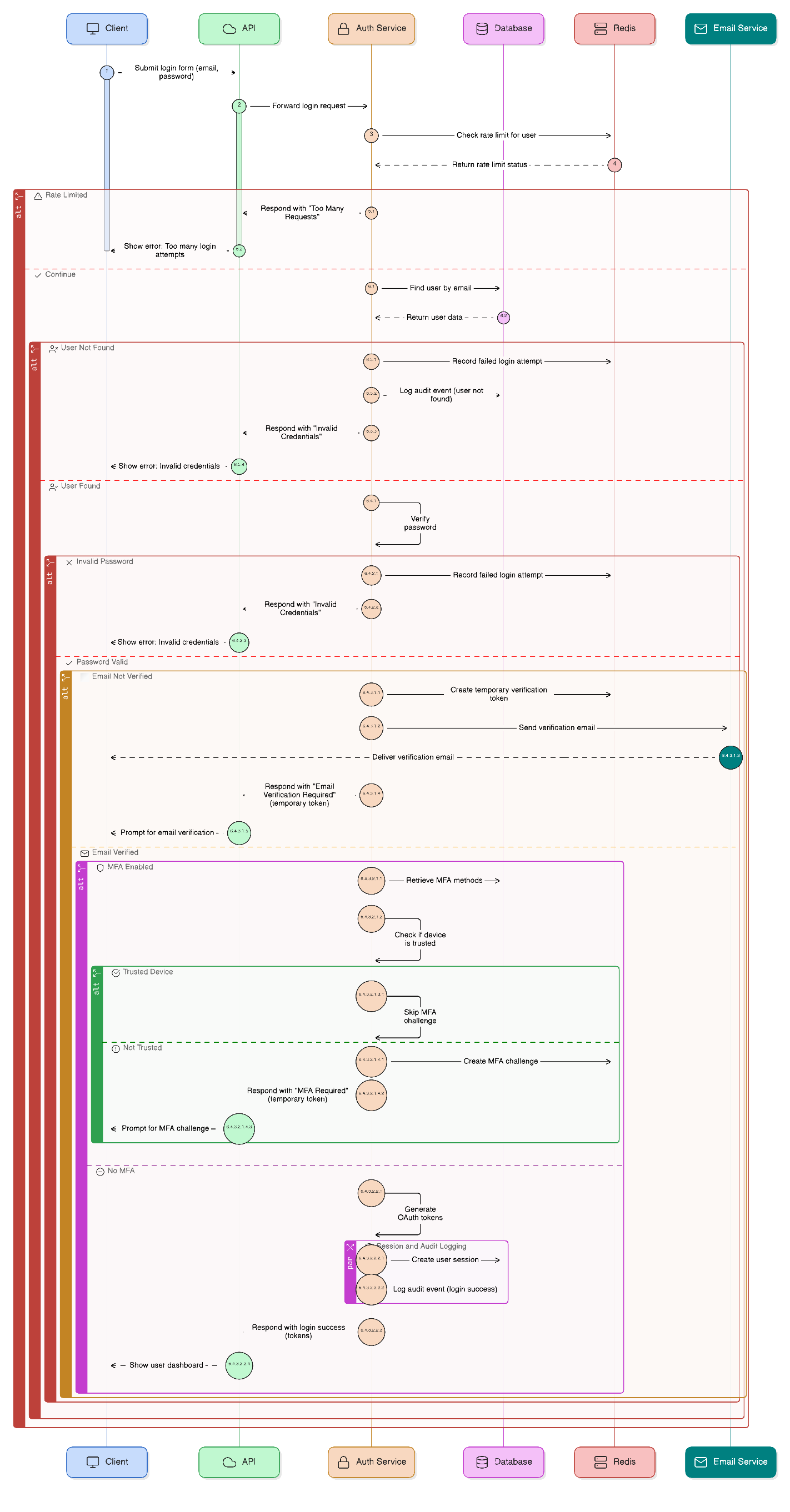
Sequence Diagram Overview:
The sequence diagram shows the detailed step-by-step interaction between all system components during the authentication process. It demonstrates the request-response flow, error handling, and conditional logic branches.
Component Interactions:
- Client -> API: Initial login request with credentials
- API -> AuthService: Delegates authentication logic to the service layer
- AuthService -> Redis: Rate limit checks and temporary token storage
- AuthService -> Database: User lookup, credential verification, session creation, and audit logging
- AuthService -> EmailService: Email notifications (when email verification is required)
Authentication Paths:
- Success Path (No MFA): User found -> Password valid -> Email verified -> No MFA -> Generate tokens -> Create session -> Return tokens
- Email Verification Required: User found -> Password valid -> Email not verified -> Return temporary token
- MFA Required: User found -> Password valid -> Email verified -> MFA enabled -> Device not trusted -> Return temporary token
- MFA Bypassed: User found -> Password valid -> Email verified -> MFA enabled -> Device trusted -> Skip MFA -> Generate tokens
- Failure Paths: Rate limited -> Return 429, User not found -> Return 401, Invalid password -> Return 401
Internal Developer Notes:
- The sequence diagram uses alt blocks to represent conditional logic branches
- Each interaction includes error handling and appropriate status code responses
- Temporary tokens have a short expiration time (typically 10-15 minutes) and are stored in Redis
- Session creation happens only after all validations pass, ensuring data consistency
- Audit events are logged synchronously to ensure all authentication attempts are tracked
- The AuthService acts as the orchestration layer, coordinating between Redis, Database, and EmailService
View Mermaid Source Code
Mermaid Sequence Diagram Notes for Developers:
This Mermaid diagram provides the editable source code for the sequence diagram above. It can be modified to reflect changes in the authentication flow architecture.
Key Technical Details:
- Rate Limiting: Implemented using Redis counters with sliding window algorithm. Keys are namespaced by IP address and user identifier.
- Password Verification: Uses bcrypt's
verify()method with constant-time comparison. Never reveals whether email exists through timing differences. - Temporary Tokens: JWT tokens with short expiration (10-15 minutes) stored in Redis. Used for multi-step authentication flows (email verification, MFA).
- Device Trust: Determined by device fingerprint hash stored in user's trusted devices table. Can be set via "remember this device" option during MFA challenge.
- Token Generation: OAuth2-compliant tokens (access_token + refresh_token) with different expiration times:
- Access token: 1 hour (configurable)
- Refresh token: 7 days (configurable)
- Session Management: Sessions are stored in the database with metadata (IP address, user agent, device info) for security auditing.
- Error Handling: All authentication failures return generic "Invalid Credentials" message to prevent user enumeration attacks. Specific error details are logged server-side only.
Registration Flow
View Registration Flow Diagram
Email Verification Flow
View Email Verification Flow Diagram
MFA Integration Flow
View MFA Integration Flow Diagram
Social Login Flow
View Social Login Flow Diagram
Password Reset Flow
View Password Reset Flow Diagram
Validations
Login Validations
- Email format validation (RFC 5322 compliant)
- Password verification using bcrypt
- Rate limiting: 5 attempts per 15 minutes per IP
- Account status check (disabled accounts rejected)
- Email verification requirement check
Signup Validations
- Email uniqueness check
- Password strength requirements:
- Minimum 8 characters
- At least one uppercase letter
- At least one lowercase letter
- At least one number
- Rate limiting: 3 attempts per 5 minutes
- Idempotency key support
Password Reset Validations
- Token expiration check (1 hour)
- Password strength validation (same as signup)
- Rate limiting: 3 requests per hour
- Token one-time use validation
Email Verification Validations
- Token expiration check (10 minutes for signup)
- Token validation and signature verification
- Idempotent operation (already verified returns success)
Social Login Validations
- Provider validation (github, google, apple, microsoft)
- Authorization code validation
- State parameter CSRF protection
- User profile validation from provider
Security Features
- Password hashing with bcrypt
- JWT token generation with expiration
- Rate limiting on sensitive endpoints
- Device fingerprinting for trust
- Audit logging for all authentication events
- Session management with expiration
- CSRF protection for OAuth flows
- Token-based email verification
- MFA integration with bypass for trusted devices
Endpoints
| Method | Endpoint | Description |
|---|---|---|
| POST | /login | User login with email/password |
| POST | /signup | User registration |
| POST | /resend-signup-otp | Resend signup OTP |
| POST | /verify-email | Verify email using token |
| POST | /verify-otp | Verify email using OTP code |
| POST | /mfa/otp/generate | Generate MFA OTP for login |
| POST | /mfa/verify | Verify MFA code |
| POST | /mfa/deactivate | Deactivate MFA methods |
| POST | /refresh-token | Refresh access token |
| GET | /me | Get current user info |
| PUT | /me/profile | Update user profile |
| POST | /me/email/request | Request email update |
| POST | /me/email/verify | Verify email update |
| POST | /forgot-password | Request password reset |
| POST | /reset-password | Reset password |
| POST | /logout | Logout from current session |
| POST | /logout-all | Logout from all sessions |
| POST | /change-password | Change password |
| GET | /oauth/{provider}/url | Get OAuth URL |
| POST | /oauth/login | Social login |
| POST | /oauth/signup | Social signup |
| GET | /oauth/{provider}/callback | OAuth callback |
| GET | /login-history | Get login history |
| GET | /social-accounts | Get connected social accounts |
Internal Notes
- All endpoints are fully implemented
- Rate limiting is enforced on sensitive endpoints
- MFA integration with
/api/v1/mfaendpoints - Device trust integration for "remember device" functionality
- Automatic organization and workspace creation on signup
- OAuth2 token format (access + refresh tokens)
Swagger Documentation
Interactive API documentation available at: /docs#/Authentication