overview
Policies API
Quick Navigation
The Policies API manages data governance policies including Row-Level Security (RLS), Data Masking, Query Limits, Access Control, and more.
Account Type & Use Case
Shared Endpoint
Policies APIs enable both Individual and Organization account users to create and manage data governance policies including row-level security, data masking, query limits, and access controls. Individual accounts use these endpoints within their personal workspace to apply policies to their personal data sources. Organization accounts use the same endpoints but can create organization-wide policies that apply across multiple workspaces, enabling centralized governance and compliance management. The API functionality is identical, but Organization accounts have broader scope and can enforce policies across team members.
Overview
This module provides:
- Policy creation and management
- Policy rule configuration
- Policy assignment to resources (data sources, datasets, queries, roles, users, workspaces)
- Policy evaluation and audit trail
- Dashboard summaries by policy type
- Priority-based policy evaluation
Policies Flow
The Policies API manages data governance policies that are enforced at runtime during query execution. The flow covers policy creation, assignment to resources, and automatic enforcement during data access operations, ensuring compliance and security without impacting query functionality.
Policies Flow Diagram
View Flow Diagram
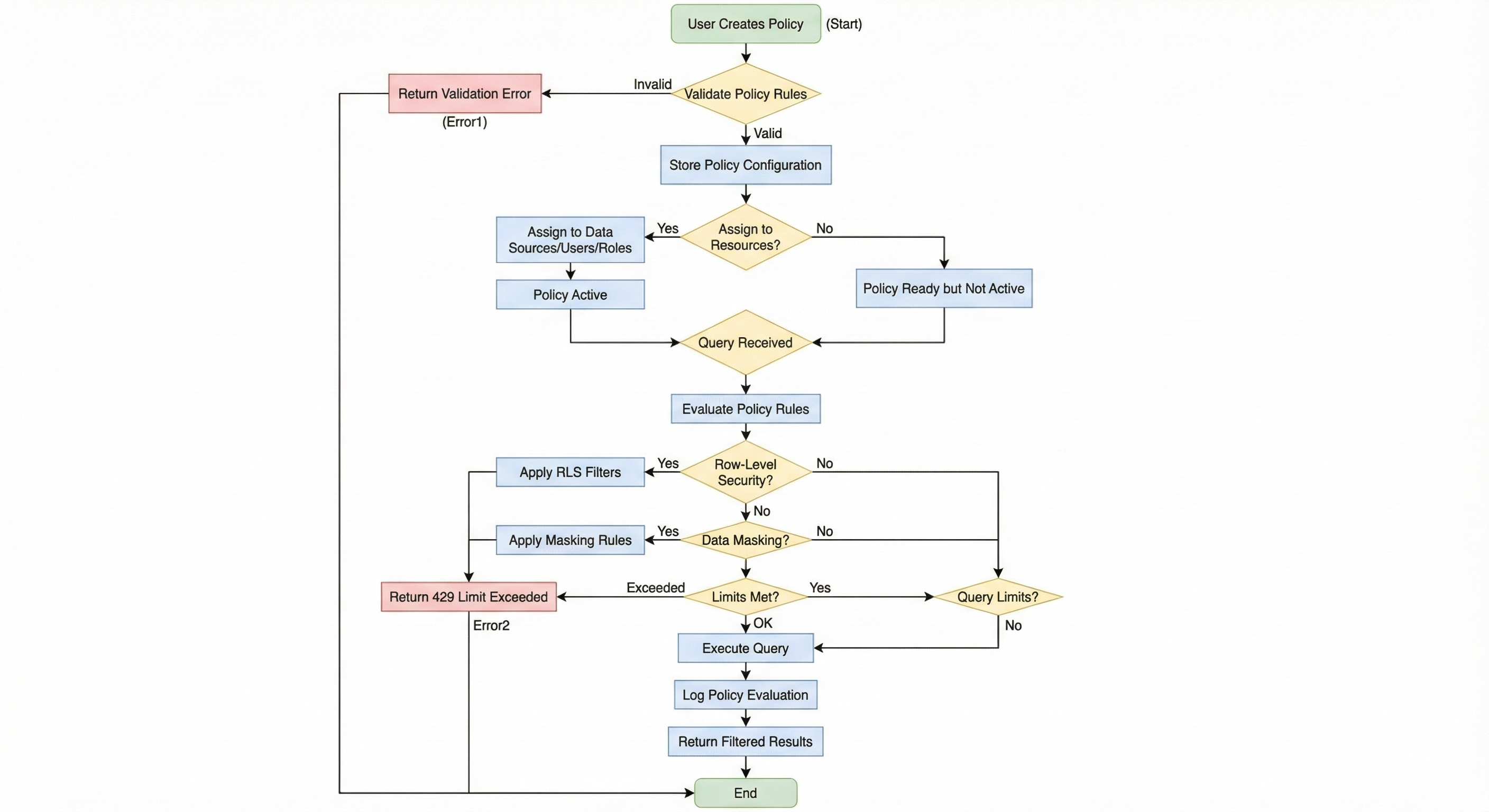
Policies Flow Overview:
This flow diagram illustrates the policy creation, assignment, and runtime enforcement workflow. It demonstrates how policies are created, assigned to resources, and automatically enforced during query execution to ensure data governance and compliance.
Key Flow Components:
- Policy Creation: Administrators create policies with rules defining governance requirements
- Policy Assignment: Policies are assigned to specific resources (data sources, users, roles, workspaces)
- Runtime Evaluation: When queries are received, policies are automatically evaluated before execution
- Row-Level Security: RLS policies filter data rows based on user context and conditions
- Data Masking: Masking policies obscure sensitive columns using various methods (full, partial, hash, redact)
- Query Limits: Limit policies enforce restrictions on query execution (rows, time, frequency)
- Policy Logging: All policy evaluations are logged for audit trails and compliance reporting
- Result Filtering: Query results are automatically filtered and masked based on applicable policies
Internal Developer Notes:
- Policies are evaluated in priority order (higher priority evaluated first)
- Policy evaluation happens at runtime, not just in metadata, ensuring compliance even with direct SQL
- Multiple policies can apply to a single query, with all applicable rules enforced
- Policy evaluations are logged with complete context for audit purposes
- Policies can be assigned to multiple resource types simultaneously
- Unassigned policies are stored but not active until assigned to resources
Base Path
All policy endpoints are prefixed with /api/v1/policies
Authentication
All endpoints require authentication:
Authorization: Bearer <access_token>
Policy Types
The API supports the following policy types:
- data_masking: Mask sensitive data in query results
- access_control: Control access to resources
- row_level_security: Filter rows based on user context
- column_level_security: Control column visibility
- query_restriction: Restrict query types or operations
- query_limit: Limit query execution (rows, time, frequency)
- data_retention: Data retention policies
- other: Custom policy types
Policy Rules
Policies can contain multiple rules that are evaluated in order:
- RLS Rules: Filter rows based on conditions (e.g.,
user_region = current_user_region) - Data Masking Rules: Mask columns using various methods (full, partial, hash, redact)
- Query Limit Rules: Limit queries per hour/day, max rows, execution time
Policy Assignments
Policies can be assigned to:
- Data sources
- Datasets
- Queries
- Roles
- Users
- Workspaces
Endpoints
| Method | Endpoint | Description |
|---|---|---|
| GET | /dashboard | Get policy dashboard summary with statistics |
| GET | / | List policies with pagination and filtering |
| GET | /{policy_id} | Get policy details by ID |
| POST | / | Create a new policy with rules and assignments |
| POST | /{policy_id}/assignments | Assign policy to resources |
| GET | /{policy_id}/evaluations | Get policy evaluation history (audit trail) |
| PATCH | /{policy_id} | Update policy configuration |
| DELETE | /{policy_id} | Delete policy (soft delete) |
Internal Notes
- All endpoints are fully implemented
- Policies are organization-scoped
- Policy evaluation is priority-based (higher priority evaluated first)
- Soft delete by default (sets
deleted_attimestamp) - Policy evaluations are logged for audit trail
- Rules are validated based on policy type
Swagger Documentation
Interactive API documentation available at: /docs#/policies