overview
Prompt Studio API
Quick Navigation
The Prompt Studio API enables natural language to SQL query generation, prompt execution, template management, and analytics.
Account Type & Use Case
Shared Endpoint
Prompt Studio APIs enable both Individual and Organization account users to query data using natural language, reducing the need for SQL expertise and enabling self-service analytics. Individual accounts use these endpoints within their personal workspace, allowing single users to query their personal data sources using natural language. Organization accounts use the same endpoints but can create prompts across multiple workspaces, share templates with team members, and access organization-wide analytics. The API functionality is identical, but Organization accounts have access to more workspaces and can collaborate on prompts and templates.
Overview
This module provides:
- Natural language prompt execution
- AI-powered SQL query generation
- Prompt history and management
- Prompt templates with parameterization
- Execution tracking and analytics
- Query analytics dashboard
Prompt Execution Flow
The Prompt Studio API enables natural language querying through AI-powered SQL generation and execution. The flow processes user prompts, generates optimized SQL queries, executes them against data sources, applies governance policies, and returns formatted results with complete analytics tracking.
Prompt Execution Flow Diagram
View Flow Diagram
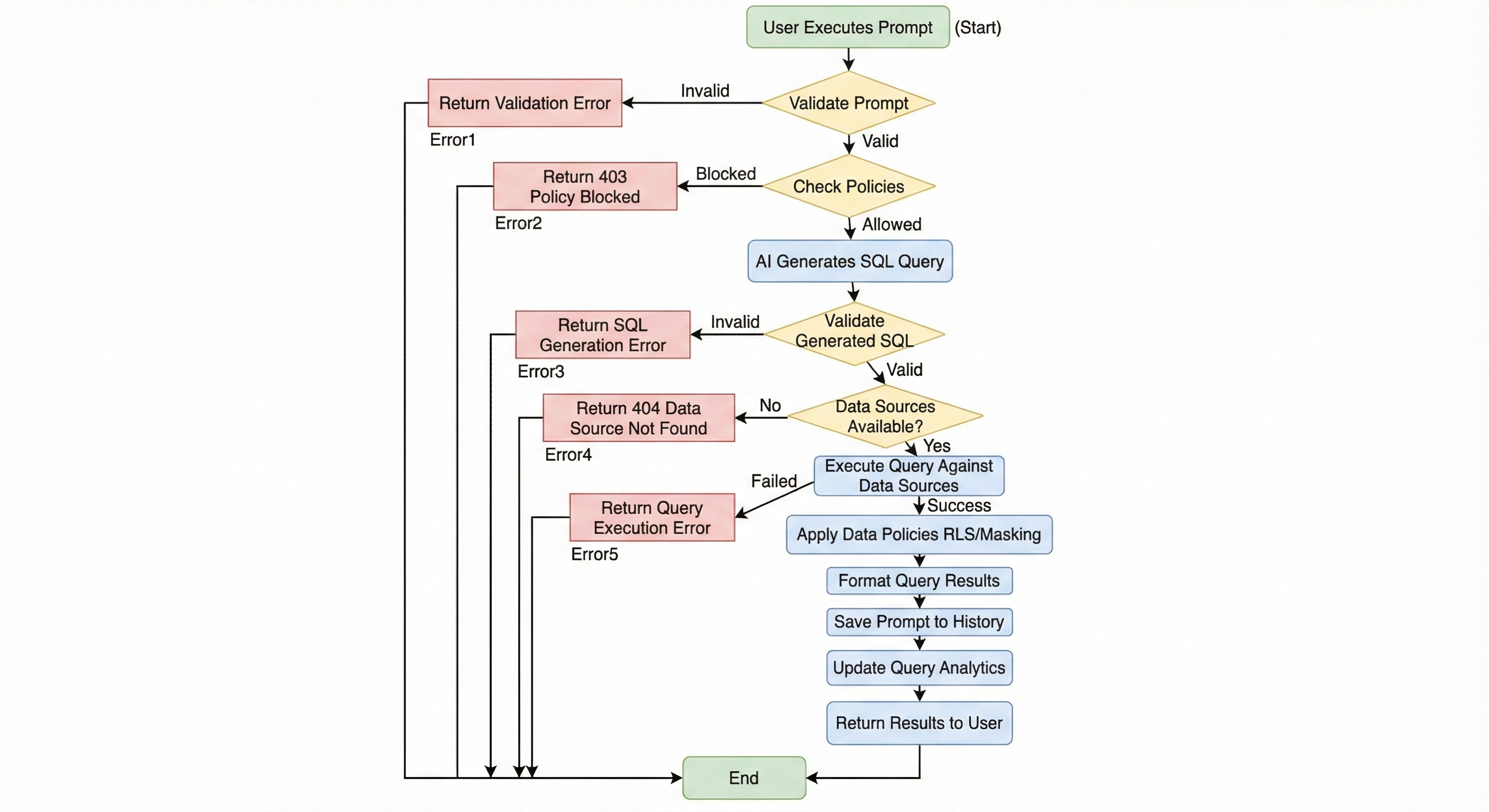
Prompt Execution Flow Overview:
This flow diagram illustrates the complete prompt execution workflow from natural language input to formatted results. It demonstrates how prompts are validated, converted to SQL, executed, and how policies are applied to ensure governance and compliance.
Key Flow Components:
- Prompt Validation: System validates the natural language prompt for completeness and data source selection
- Policy Pre-Check: Verifies that the prompt and user have permission to access requested data sources
- AI SQL Generation: AI model analyzes the prompt and generates optimized SQL query based on discovered schema
- SQL Validation: Generated SQL is validated for syntax, safety, and compatibility with data sources
- Data Source Verification: Confirms that selected data sources are available and accessible
- Query Execution: Executes the generated SQL against federated data sources
- Policy Application: Applies row-level security, data masking, and query limits to results
- Result Formatting: Formats query results with metadata and execution information
- History & Analytics: Saves prompt to history and updates analytics for usage tracking
Internal Developer Notes:
- AI model selection is configurable and supports multiple providers
- SQL generation uses discovered schema information for accuracy
- Query execution supports federated queries across multiple data sources
- Policy enforcement happens automatically during query execution
- All prompts are saved to history for reuse and analytics
- Execution is tracked with detailed metadata including timing, data sources used, and result sizes
- Failed queries are logged with error details for troubleshooting
Base Paths
The API is organized into multiple routers:
- Main Router:
/api/v1/prompts- Prompt management and execution - Executions Router:
/api/v1/prompt-executions- Execution status tracking - Templates Router:
/api/v1/prompt-templates- Template management - Analytics Router:
/api/v1/prompts/analytics- Query analytics
Authentication
All endpoints require authentication:
Authorization: Bearer <access_token>
Prompt Execution Flow
- Execute Prompt: Submit natural language prompt with data source selection
- AI Processing: AI generates SQL query from prompt
- Query Execution: Generated query is executed against selected data sources
- Result Return: Query results are returned with metadata
Execution Statuses
processing: AI is generating querycompleted: Query executed successfullyfailed: Execution faileddraft: Prompt saved but not executed
Prompt Templates
- Reusable prompt templates with parameters
- Template categories for organization
- System templates and user-created templates
- Public/private template sharing
- Template execution with parameter substitution
Analytics
- Execution statistics per prompt
- Query performance metrics
- Data source usage analytics
- Success rate tracking
- Time series analytics
Endpoints
Main Router (/api/v1/prompts)
| Method | Endpoint | Description |
|---|---|---|
| GET | /history | Get prompt history with filtering |
| GET | / | List prompts with pagination |
| GET | /{prompt_id} | Get prompt details |
| POST | /execute | Execute a natural language prompt |
| GET | /{prompt_id}/executions | Get execution history for a prompt |
| GET | /{prompt_id}/analytics | Get analytics for a prompt |
| PATCH | /{prompt_id} | Update prompt |
| DELETE | /{prompt_id} | Delete prompt (soft delete) |
| DELETE | /history/clear | Clear prompt history |
Executions Router (/api/v1/prompt-executions)
| Method | Endpoint | Description |
|---|---|---|
| GET | /{execution_id} | Get execution status by ID |
Templates Router (/api/v1/prompt-templates)
| Method | Endpoint | Description |
|---|---|---|
| GET | / | List prompt templates |
| GET | /{template_id} | Get template details |
| POST | / | Create prompt template |
| POST | /{template_id}/execute | Execute template with parameters |
Analytics Router (/api/v1/prompts/analytics)
| Method | Endpoint | Description |
|---|---|---|
| GET | /query-analytics | Get comprehensive query analytics |
Internal Notes
- All endpoints are fully implemented
- Prompts are organization-scoped
- Soft delete by default (sets
deleted_attimestamp) - AI model selection supported
- Execution tracking with detailed metadata
- Template parameters use
{{param}}syntax - Analytics support multiple time periods
Swagger Documentation
Interactive API documentation available at: /docs#/prompt-studio