Multi-Factor Authentication API
The MFA API provides multi-factor authentication setup and management.
Quick Navigation
Overview
This module supports:
- TOTP (Time-based One-Time Password) via authenticator apps
- Email OTP
- Backup codes
- Device management
Base Path
All MFA endpoints are prefixed with /api/v1/mfa
Authentication
All endpoints require authentication:
Authorization: Bearer <access_token>
MFA Flow
The MFA system provides multiple authentication methods to enhance account security. Users can set up TOTP, Email OTP, or use backup codes as recovery options. The system supports device trust to streamline the authentication experience for trusted devices.
MFA Flow Diagram
View Flow Diagram
MFA Flow Overview:
This flow diagram illustrates the complete MFA authentication decision tree. It shows how the system evaluates MFA requirements, device trust status, and handles different MFA methods.
Key Flow Components:
- MFA Check: System verifies if MFA is enabled for the user account
- Device Trust Evaluation: For MFA-enabled accounts, checks if the device is trusted
- MFA Method Selection: User can choose between TOTP, Email OTP, or Backup Codes
- Code Verification: Validates the provided MFA code with rate limiting
- Device Trust Option: User can choose to remember the device for future logins
- Account Protection: Failed attempts trigger account lockout after 3 tries
Internal Developer Notes:
- Device trust bypasses MFA challenge for trusted devices
- Each MFA method has its own verification process and expiration times
- Rate limiting prevents brute-force attacks on MFA codes
- Backup codes are single-use and expire after use
- Device trust tokens expire after 5 minutes if not activated
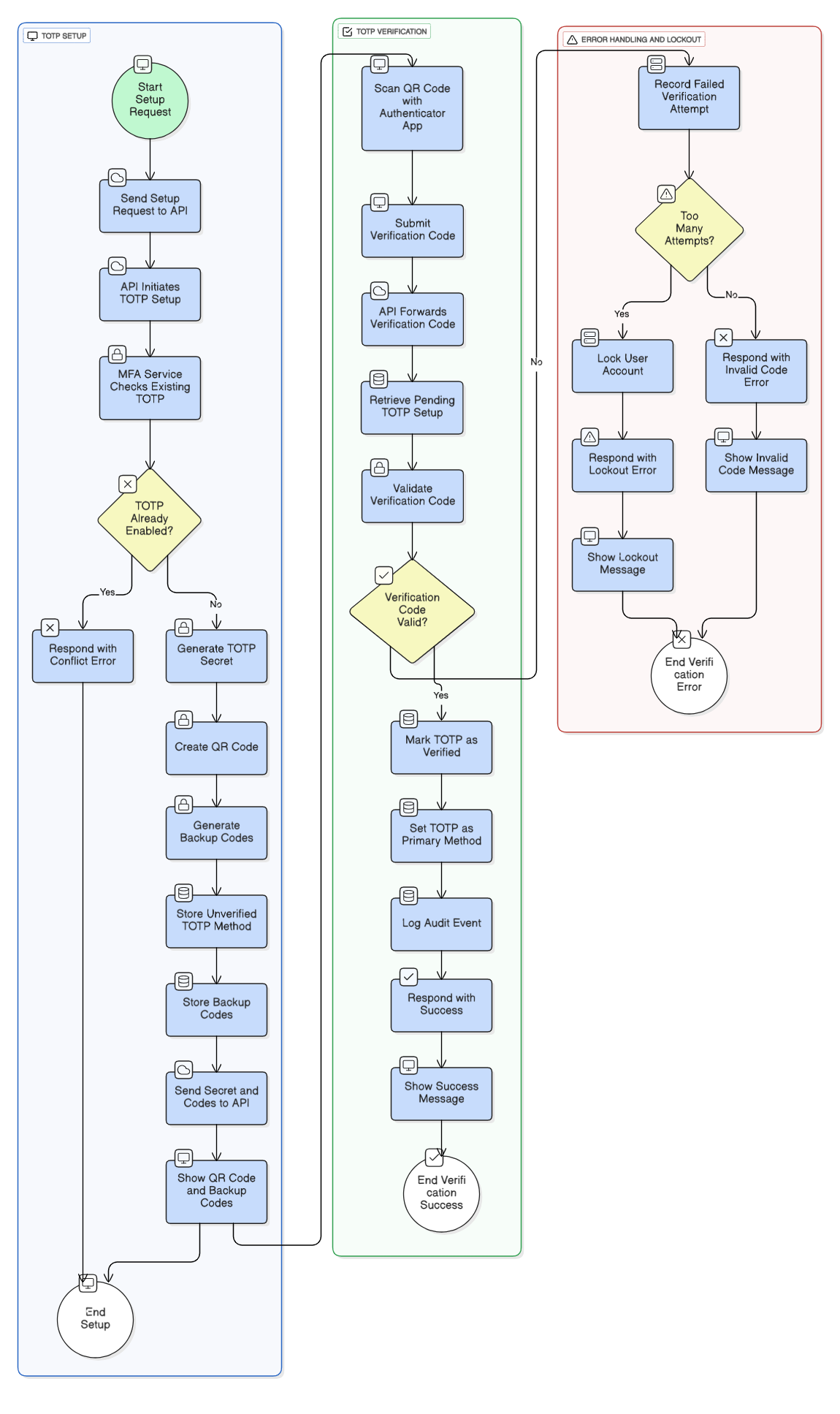
MFA Setup Flow (TOTP)
View MFA Setup Flow Diagram
MFA Verification Flow (During Login)
View MFA Verification Flow Diagram
Backup Codes Flow
View Backup Codes Flow Diagram
Validations
TOTP Setup Validations
- Device name uniqueness check (optional)
- TOTP secret generation (RFC 6238 compliant)
- QR code generation with proper encoding
- Backup code generation (10 codes, 8 characters each)
- Rate limiting: 3 setup attempts per 60 seconds
TOTP Verification Validations
- Code format validation (6 digits)
- Time window validation (30 seconds tolerance)
- Rate limiting: 3 attempts per 60 seconds
- Lockout after 3 failed attempts (60 seconds)
Email OTP Setup Validations
- Primary email verification check
- Email OTP uniqueness check
- Backup code generation
Email OTP Verification Validations
- OTP code format (6 digits)
- OTP expiration check (10 minutes)
- Rate limiting: 3 attempts per 60 seconds
- Attempt limit: 5 max attempts per OTP
Backup Codes Validations
- Code format validation (8 alphanumeric characters)
- One-time use validation
- Code expiration check
- Hash verification
Security Features
- TOTP secret stored securely (not retrievable after setup)
- Backup codes hashed with bcrypt
- One-time use for backup codes
- Rate limiting on verification attempts
- Account lockout after failed attempts
- Audit logging for all MFA operations
- Automatic backup code generation on setup
- Primary method designation
Endpoints
| Method | Endpoint | Description |
|---|---|---|
| POST | /totp/setup | Setup TOTP MFA |
| POST | /totp/verify | Verify TOTP setup |
| POST | /email-otp/setup | Setup Email OTP MFA |
| POST | /email-otp/verify | Verify Email OTP setup |
| GET | /status | Get MFA status |
| GET | /totp/devices | List TOTP devices |
| DELETE | /totp/devices/{device_id} | Remove TOTP device |
| POST | /backup-codes/generate | Generate backup codes |
| GET | /backup-codes | Get masked backup codes |
| POST | /totp/reset | Reset TOTP setup |
Internal Notes
- All endpoints are fully implemented
- Rate limiting on verification endpoints (3 attempts, 60s lockout)
- Backup codes are automatically generated on MFA setup
- TOTP supports multiple devices per user
- Email OTP uses the OTP service for code generation
- MFA status integrates with device trust for login flows
Swagger Documentation
Interactive API documentation available at: /docs#/mfa