Data Sources API
Quick Navigation
Overview
The Data Sources API manages data source connections, schema discovery, connection health monitoring, and credential management. This API enables unified access to 30+ data source types including SQL databases, NoSQL databases, cloud data warehouses, file storage systems, and APIs.
This module provides:
- Data source creation and management
- Connection testing and validation
- Schema discovery and exploration
- Connection health monitoring
- Credential management
- Support for multiple data source types (SQL, NoSQL, Cloud, Files, Streaming, API)
- SSH tunnel support
- Connection pooling and timeout configuration
Account Type & Use Case
Shared Endpoint
Data Sources APIs enable both Individual and Organization account users to connect, manage, and query data across 30+ data sources from a unified interface. Individual accounts use these endpoints within their personal workspace, allowing single users to connect and query data sources for personal projects. Organization accounts use the same endpoints but can create data sources across multiple workspaces, enabling team collaboration and shared data access. The API functionality is identical, but Organization accounts have access to more workspaces and can share data sources with team members.
Overview
This module provides:
- Data source creation and management
- Connection testing and validation
- Schema discovery and exploration
- Connection health monitoring
- Credential management
- Support for multiple data source types (SQL, NoSQL, Cloud, Files, Streaming, API)
- SSH tunnel support
- Connection pooling and timeout configuration
Data Sources Flow
The Data Sources API manages the complete lifecycle of data source connections, from initial creation through ongoing health monitoring. The flow ensures secure credential management, validates connectivity, discovers schema structures, and continuously monitors connection health to maintain reliable data access.
Data Sources Flow Diagram
View Flow Diagram
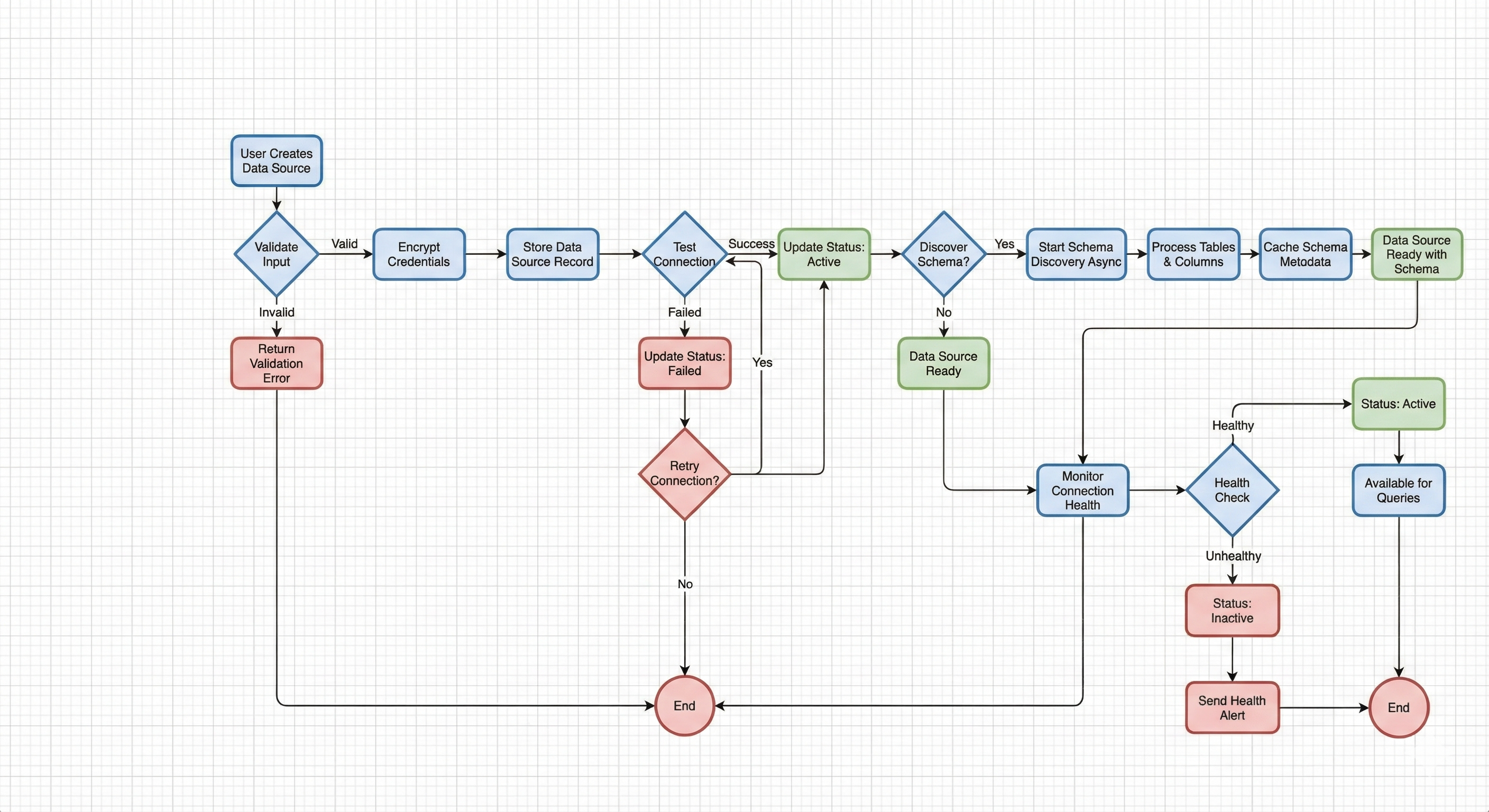
Data Sources Flow Overview:
This flow diagram illustrates the complete data source lifecycle from creation through health monitoring. It demonstrates how data sources are validated, encrypted, tested, and monitored to ensure reliable data access.
Key Flow Components:
- Data Source Creation: User provides connection details which are validated and encrypted before storage
- Connection Testing: System automatically tests connectivity to verify credentials and network access
- Schema Discovery: Optional async process that catalogs database structure (tables, columns, relationships)
- Health Monitoring: Continuous monitoring of connection status, response times, and availability
- Status Management: Data sources transition through states (testing, active, inactive, failed) based on connection health
- Error Handling: Failed connections can be retried, with status updates and alerts for administrators
Internal Developer Notes:
- Credentials are encrypted at rest using organization-specific encryption keys
- Connection testing and schema discovery run in thread pool executors to prevent blocking the event loop
- Schema discovery is an async operation that may take time for large databases
- Health checks run periodically and update connection status automatically
- Connection metrics include pool utilization, circuit breaker states, and cache statistics
Base Path
All data source endpoints are prefixed with /api/v1/data-sources
Authentication
All endpoints require authentication:
Authorization: Bearer <access_token>
Data Source Types
The API supports the following data source types:
SQL Databases
- PostgreSQL
- MySQL
- MariaDB
- SQL Server
- Oracle
- Snowflake
- BigQuery
- Redshift
NoSQL Databases
- MongoDB
- Elasticsearch
- Redis
- Cassandra
- DynamoDB
File-Based Sources
- CSV
- Excel
- JSON
- Parquet
- ORC
- Delta Lake
- Iceberg
- Hudi
- S3
Other
- HTTP API
- Other (custom)
Connection Management
Connection Pooling
- Configurable pool size (default: 5)
- Connection timeout (default: 30 seconds)
- Query timeout (default: 300 seconds)
- Max retries (default: 3)
SSH Tunnels
- Support for SSH tunnel connections
- Configurable SSH host, port, and credentials
- Automatic local port assignment
Connection Health
- Automatic health monitoring
- Connection status tracking (active, inactive, testing, failed, maintenance)
- Health history with response time metrics
- Uptime percentage calculation
Schema Discovery
- Automatic schema discovery for databases
- Configurable auto-refresh interval (default: 3600 seconds)
- Manual schema refresh support
- Schema caching for performance
- Support for multiple schemas per data source
- Column-level metadata (types, constraints, comments)
Note: Schema discovery is an async operation that runs in a thread pool executor to prevent blocking the event loop. Large databases may take time to discover.
Endpoints
| Method | Endpoint | Description |
|---|---|---|
| GET | / | List data sources with pagination and filtering |
| GET | /{data_source_id} | Get data source details by ID |
| POST | / | Create a new data source |
| PATCH | /{data_source_id} | Update data source configuration |
| PATCH | /{data_source_id}/credentials | Update data source credentials |
| GET | /{data_source_id}/file-url | Get presigned URL for file-based data source |
| POST | /{data_source_id}/test | Test data source connection |
| POST | /{data_source_id}/discover-schema | Discover and cache database schema (async) |
| GET | /{data_source_id}/schemas | Get discovered schema information |
| GET | /{data_source_id}/health | Get connection health status and history |
| GET | /metrics | Get connection metrics for monitoring |
| DELETE | /{data_source_id} | Delete data source (soft delete by default) |
Internal Notes
- All endpoints are fully implemented
- Connection testing and schema discovery run in thread pool executor (non-blocking)
- Supports file-based data sources via
file_pathparameter (use storage API to get file paths) storage_file_idparameter is deprecated - usefile_pathinstead- Connection metrics include cache statistics, connection counts, pool utilization, and circuit breaker states
- Soft delete by default (use
force=truefor hard delete) - Organization-scoped: users can only access data sources in their organization
- Credentials are encrypted at rest
Swagger Documentation
Interactive API documentation available at: /docs#/data-sources