Agent Pipeline Details
Page Outline
- Agent vs AI Service Distinction
- Parent (Domain) Agent Hierarchy
- PSA Agentic Loop
- PSA Tool Registry
- Multi-Intent Decomposition
- Multi-LLM Routing (Per-Turn)
- Cost and Performance Metrics
- Dual-Layer Confirmation System
- Edge Cases and Error Recovery
- PSA Tool Specifications
- Concrete Integration Examples
- Sample Response Payloads
- LLM Agent Configuration
- Related
This document provides the exhaustive technical specification for the Prompt Studio Agent (PSA) pipeline, including the iterative agentic loop, multi-intent decomposition, and the dual-layer confirmation safety system.
Agent vs AI Service Distinction
RiverGen separates intelligence into two layers to ensure consistency and reusability across the ecosystem.
| Layer | Purpose | Characteristics |
|---|---|---|
| Domain Agents | Orchestrate complex, multi-step reasoning | Stateful within a workflow, use tools dynamically |
| AI Services | Provide intelligence capabilities | Stateless, reusable, callable by agents or backend directly |
Key Architectural Rules
- Stable Core: Keep the number of parent agents small and stable (currently 5).
- Infinite Internals: Allow unlimited sub-agents internally as complexity grows.
- Direct Access: Not every workflow must go through an agent -- simple flows can call AI Services directly.
- Statelessness: AI Services must be reusable, stateless, and callable independently.
Parent (Domain) Agent Hierarchy
The RiverGen ecosystem is organized into five primary domain agents.
1. PSA -- Prompt Studio Agent
Complete dynamic orchestrator for all platform operations -- queries, CRUD, governance, write-back, discovery, administration, and more.
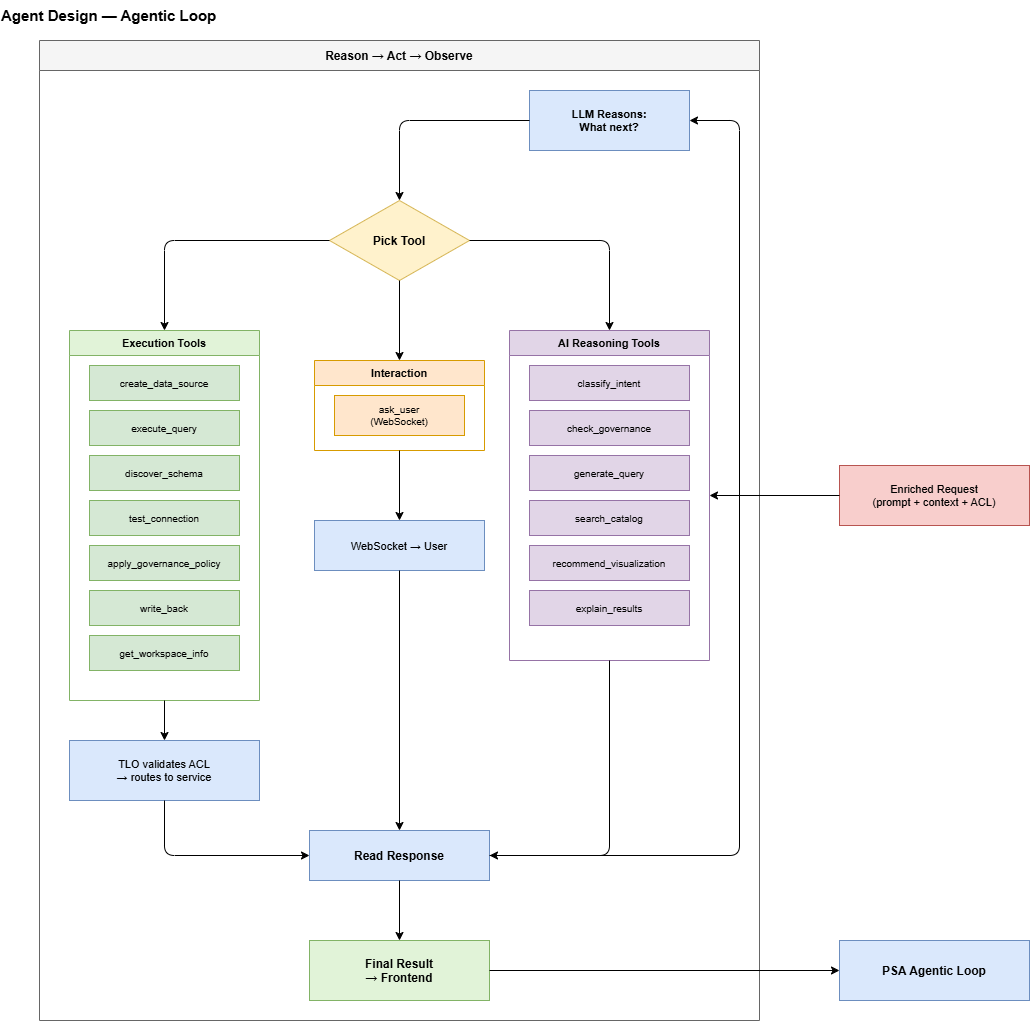
PSA is implemented as a dynamic LLM agent with tool-calling using an agentic loop (Reason -> Act -> Observe -> Reason -> ...). It can perform any action the user can do via the UI using natural language.
PSA has two categories of tools: AI Reasoning tools for thinking and planning, and Execution tools for acting on downstream services. Each execution tool call goes through the TLO Gateway, which validates the user's ACL before routing to the appropriate service (Backend, Data Orchestration, Storage, etc.). PSA never calls any service directly.
2. MSA -- Model Studio Agent
Manages ML model training, evaluation, deployment, and monitoring.
| Sub-Agent | Description | Status |
|---|---|---|
| Training Data Planner | Select and prepare training datasets | [PLANNED] |
| Feature Engineering Agent | Feature selection, transformation, and creation | [PLANNED] |
| Compute Selector | Choose appropriate compute resources (CPU/GPU) | [PLANNED] |
| Evaluation Agent | Model performance evaluation and comparison | [PLANNED] |
| Deployment Agent | Model serving and versioning | [PLANNED] |
3. DIA -- Decision Intelligence Agent
Decision workflow building, simulation, and automated action execution.
| Sub-Agent | Description | Status |
|---|---|---|
| Workflow Builder | Build decision graphs with conditional steps | [PLANNED] |
| Threshold Optimizer | Optimize decision thresholds and rules | [PLANNED] |
| Simulation Agent | What-if analysis and backtesting | [PLANNED] |
| Impact Estimator | ROI, cost, and risk estimation | [PLANNED] |
| Action Router | Route approved decisions to target systems | [PLANNED] |
4. GA -- Governance Agent
Policy management, compliance enforcement, and audit.
| Sub-Agent | Description | Status |
|---|---|---|
| Policy Compiler | Convert policy definitions into enforceable constraints | [PARTIAL] |
| Masking/RLS Injector | Inject masking and RLS into execution plans | [IMPLEMENTED] |
| Risk Scorer | Score data access risk level | [PLANNED] |
| Approval Gate | Human-in-the-loop approval workflows | [PLANNED] |
| Audit/Lineage Agent | Track full lineage from prompt to write-back | [PLANNED] |
5. OSA -- Operational Service Agent
Connector execution, operational workflows, and system reliability.
| Sub-Agent | Description | Status |
|---|---|---|
| Connector Execution Agent | Execute queries/API calls via connectors | [PARTIAL] |
| Retry & Idempotency Agent | Handle retries with idempotency guarantees | [PLANNED] |
| Notification Agent | Send alerts and notifications | [PLANNED] |
| Runbook Executor | Execute automated operational runbooks | [PLANNED] |
PSA Agentic Loop
The PSA agent uses an agentic tool-calling loop (Reason -> Act -> Observe -> Reason -> ...). Unlike a static plan-then-execute model, PSA reasons and acts iteratively -- calling tools, reading responses, and adapting its plan mid-turn.
The Reasoning Cycle
Key Behaviors
- Iterative: PSA calls one tool at a time, reads the response, and decides the next step.
- Adaptive: Each step can adapt based on previous results (e.g., schema discovery revealing table names filters the next query).
- Per-call ACL: Each execution tool call goes through TLO for ACL validation -- not a single upfront check.
- Non-Linear: Tools can be called in any order based on real-time reasoning.
- Interactive:
ask_usercan be called at any point for clarification, confirmation, or credential input. - Resilient: Error recovery triggers specific patterns -- retry, escalate model, or ask user.
PSA Tool Registry
PSA operates through three distinct tool categories. All execution tools are strictly routed through the TLO Gateway for security enforcement.
1. AI Reasoning Tools
These tools are used by the agent to think, plan, and evaluate its own logic.
| Tool | AI Service | Purpose | Status |
|---|---|---|---|
classify_intent | RiverPlan | Classify NL prompt into structured intent + action type | [PLANNED] |
check_governance | RiverGuard | Evaluate RBAC, RLS, masking, and action-level permissions | [PLANNED] |
generate_query | RiverPlan | Generate optimized SQL/NoSQL queries with governance applied | [PLANNED] |
search_catalog | RiverSemantic | Find relevant schema assets via vector similarity | [PLANNED] |
recommend_visualization | RiverViz | Suggest charts and display formats for query results | [PLANNED] |
explain_results | RiverPlan | Score confidence and provide reasoning for outcomes | [PLANNED] |
2. Execution Tools (Validated by TLO)
These tools perform actual operations on downstream platform services.
| Tool | Backend API | Purpose | Status |
|---|---|---|---|
create_data_source | POST /data-sources | Register a new database connection | [PLANNED] |
update_data_source | PATCH /data-sources/:id | Update connection settings | [PLANNED] |
delete_data_source | DELETE /data-sources/:id | Permanently remove a data source | [PLANNED] |
test_connection | POST /data-sources/test | Validate host/credential connectivity | [PLANNED] |
discover_schema | POST /data-sources/discover | Introspect tables, columns, and metadata | [PLANNED] |
execute_query | Data Orch | Run generated SELECT or DML commands | [PLANNED] |
apply_governance_policy | POST /policies | Create or update RBAC/RLS access rules | [PLANNED] |
write_back | Data Orch | Atomic record insertion/update to target system | [PLANNED] |
get_workspace_info | GET /workspaces/:id | Retrieve workspace-level settings and members | [PLANNED] |
get_storage_info | GET /storage/usage | Retrieve storage utilization metrics | [PLANNED] |
3. Interaction Tools
Used for bidirectional communication with the end-user.
| Tool | Channel | Purpose | Status |
|---|---|---|---|
ask_user | WebSocket | Request clarification, credentials, or explicit approval | [PLANNED] |
Multi-Intent Decomposition
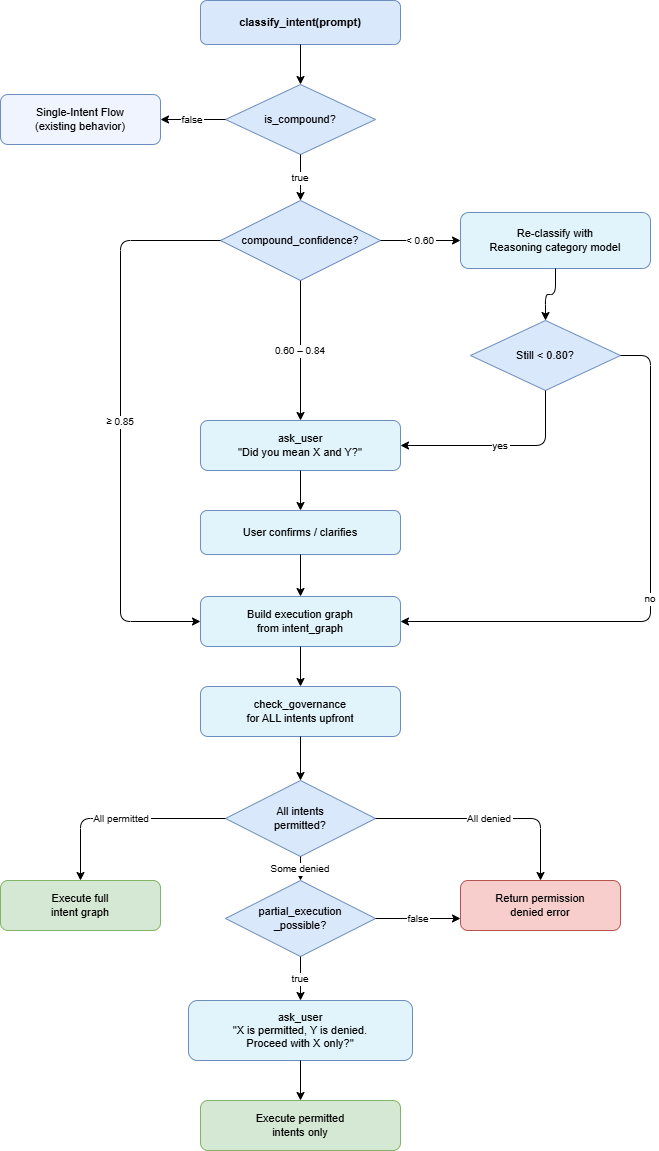
When PSA detects multiple distinct intents in a single user prompt (e.g., "Query data AND write results to a new table"), it decomposes them into an ordered execution graph.
Execution Order Rules
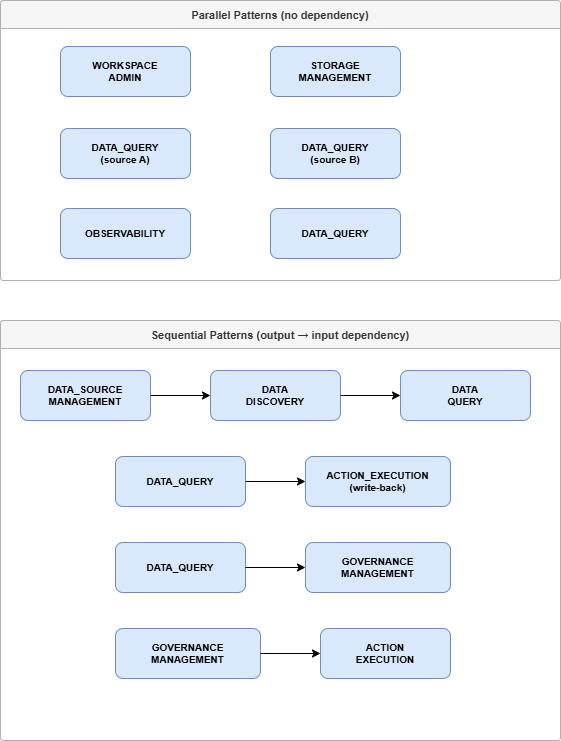
| Order Type | Scenario | Example Case |
|---|---|---|
| Sequential | Step B depends on Step A output | "Query data AND write back results" |
| Parallel | Steps are independent | "Show storage usage AND list workspace members" |
| Conditional | Step B depends on Step A logic | "Find overdue invoices; if any exist, alert user" |
Multi-Intent Governance
- Upfront Validation: PSA performs a single
check_governancecall for all intents at the start. - Partial Execution: If some intents are permitted and others denied, PSA uses
ask_userto provide the choice to proceed with the permitted subset only. - Single Context: All decomposed intents share the same execution context and metadata for consistency.
Dependency Matrix
| Primary Intent | Secondary Intent | Order Type | Data Dependency |
|---|---|---|---|
| Data Source Mgmt | Data Discovery | Sequential | Discovery needs the source ID |
| Data Discovery | Data Query | Sequential | Query needs the discovered schema |
| Data Query | Write-Back | Sequential | Write needs query result data |
| Workspace Admin | Storage Mgmt | Parallel | Independent platform lookups |
Multi-LLM Routing (Per-Turn)
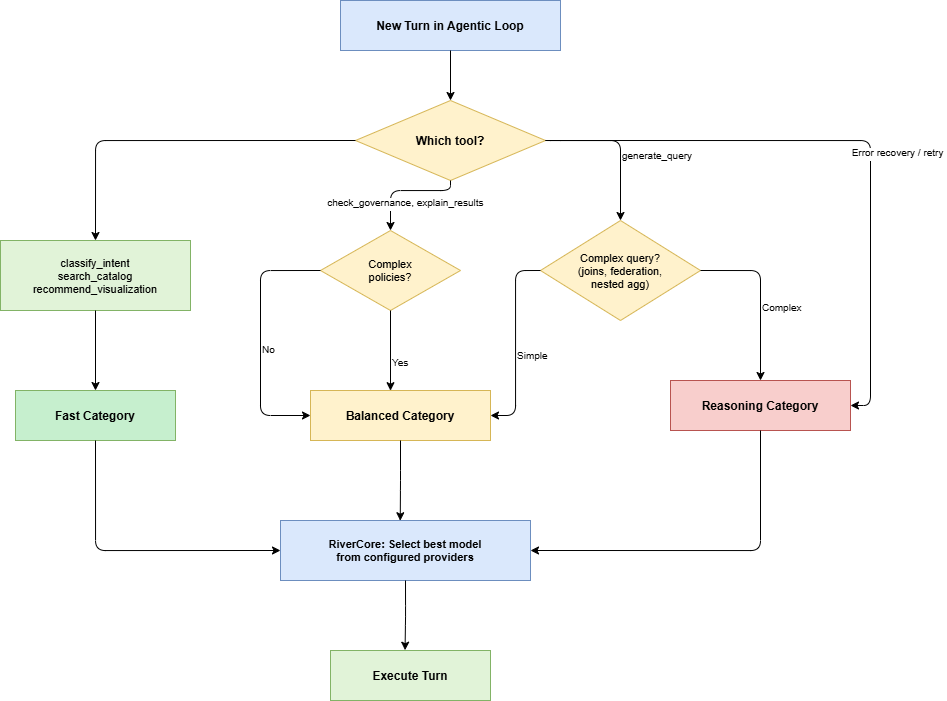
PSA optimizes for cost, latency, and quality by dynamically routing each turn to the most appropriate AI model. This selection is handled by RiverCore, which abstracts specific providers (Gemini, OpenAI, Claude, DeepSeek) into general capability categories.
Model Categories
| Category | Typical Models | Strengths | Avg Latency | Relative Cost |
|---|---|---|---|---|
| Fast | GPT-4o-mini, Gemini Flash Lite | Classification, pattern matching, simple lookups | ~200ms | 1x |
| Balanced | GPT-4o, Claude Sonnet, Gemini Flash | Standard query generation, structured reasoning | ~500ms | 3x |
| Reasoning | o3, Gemini Pro, Claude Opus | Multi-join SQL, federation, ambiguity resolution | ~2s | 10x |
| Coding | GPT-4o, Claude Sonnet, DeepSeek-V3 | SQL/NoSQL generation, dialect optimization | ~800ms | 4x |
Escalation and Fallback Rules
- Low Confidence: If
classify_intentreturns confidence<0.7, the turn escalates to the Balanced category. - Complex Operations: Multi-source federation, 3+ table joins, or nested subqueries trigger escalation to the Reasoning category.
- Error Recovery: Any tool call that returns a recoverable error (e.g., syntax error) escalates to the next higher category for the retry.
- Provider Fallback: If the primary provider for a category is unavailable (503/Rate Limit), RiverCore cycles through the fallback chain (e.g., Gemini -> OpenAI -> Anthropic).
Cost and Performance Metrics
The pipeline is optimized for token efficiency and operational transparency.
- Latency Optimization: Reasoning models are only used for 20% of turns (complex query gen and error recovery).
- Token Caching: System instructions are cached via LLM provider-native context caching to reduce per-turn costs.
- Turn Enforcement: Execution is terminated if the agent exceeds 15 turns without reaching a completion state.
- Spatial Limits: Query result previews are capped at 1000 rows to maintain frontend responsiveness.
Dual-Layer Confirmation System
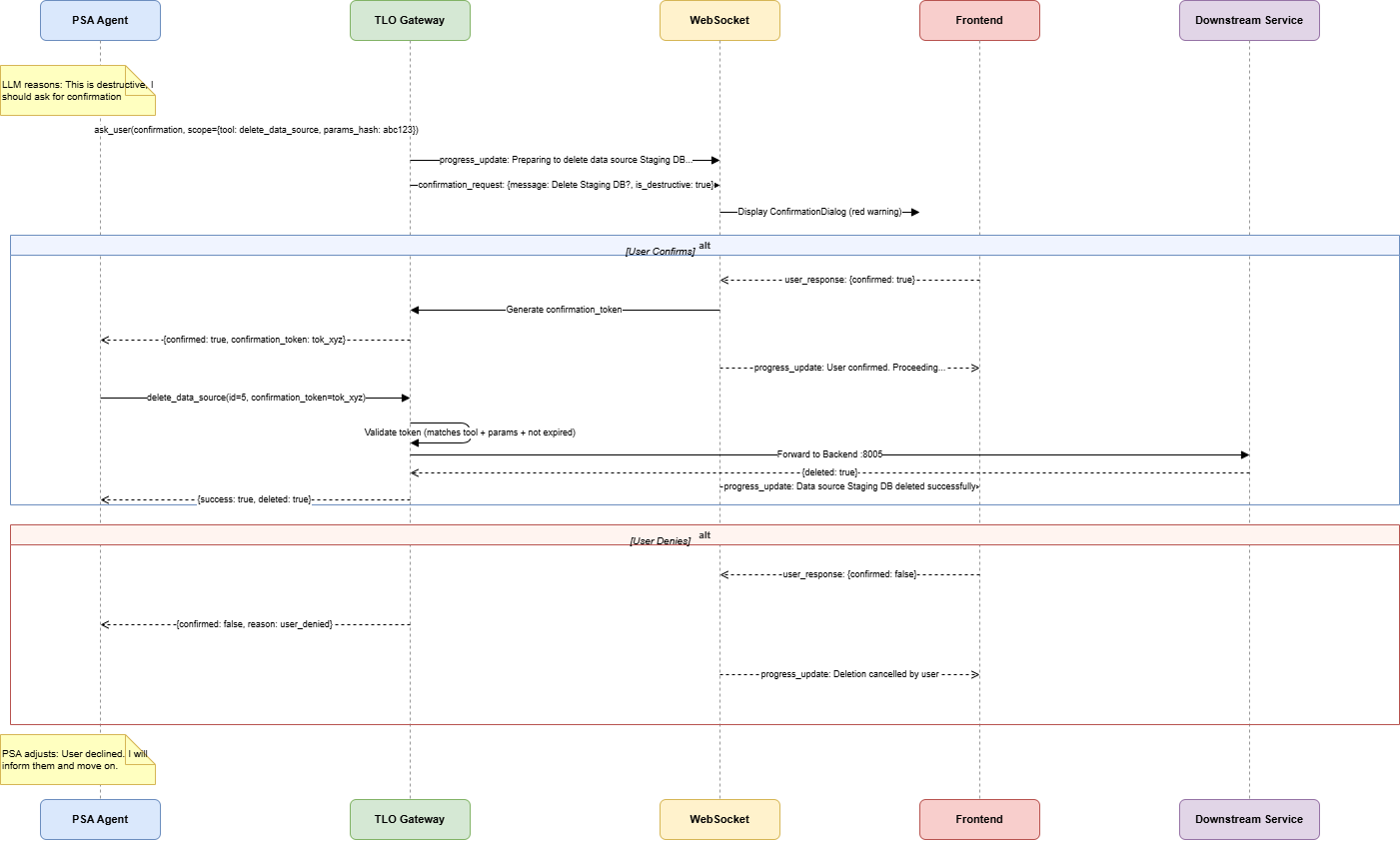
Destructive operations (UPDATE, DELETE, INSERT, policy changes) strictly require user confirmation. RiverGen enforces this via two independent layers to prevent accidental or unauthorized execution if PSA's logic fails.
Confirmation Layers
| Layer | Initiator | Trigger Condition | Primary Purpose |
|---|---|---|---|
| Layer 1 | PSA Agent | identified via LLM reasoning during the loop | Proactive -- providing the best conversational flow |
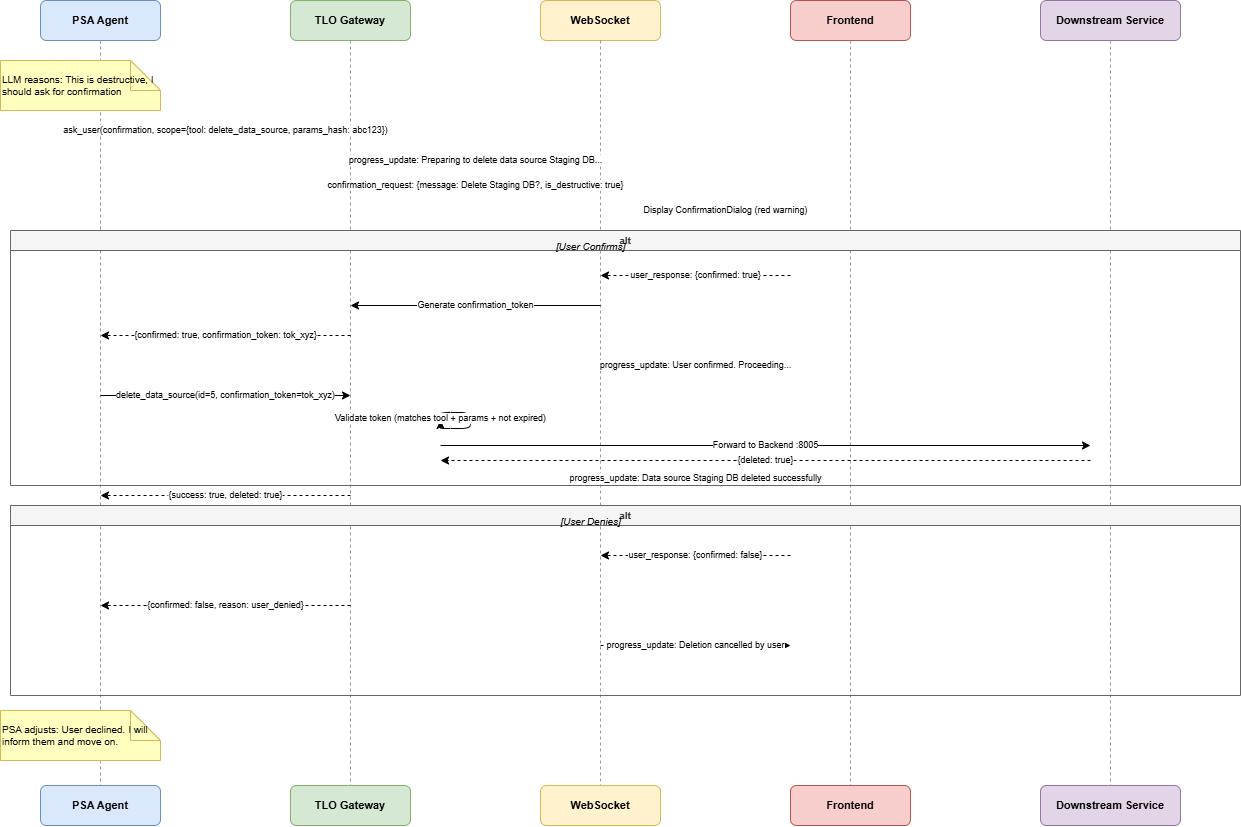
| Layer 2 | TLO Gateway | restricted API called without a confirmation_token | Safety net -- catches reasoning errors or logic bypasses |
1. PSA-Initiated (Proactive)
PSA identifies a destructive requirement through classify_intent (needs_confirmation: true) or system instructions. It proactive calls ask_user before the execution tool call.
2. Backend-Enforced (Safety Net)
If PSA calls a restricted tool without a token, the TLO Gateway intercepts the request, pauses execution, and triggers a backend-enforced confirmation dialog via WebSocket.
API Confirmation Registry
The TLO Gateway maintains a strict registry of operations that trigger the Layer 2 safety net.
| Execution Tool | Requires Confirmation | Reason for Requirement |
|---|---|---|
create_data_source | No | Non-destructive resource creation |
update_data_source | Yes | Modifies existing production resources |
delete_data_source | Yes | Destructive -- permanently removes assets |
discover_schema | No | Read-only metadata introspection |
execute_query (SELECT) | No | Read-only data retrieval |
execute_query (DML) | Yes | Modifies data in source database (UPDATE/DELETE) |
apply_governance_policy | Yes | Changes access rules for all workspace users |
write_back | Yes | Destructive modification of source systems |
Confirmation Token Structure
The confirmation_token is a single-use proof of user approval scoped to a specific tool call.
{
    "token_id": "ctok_a1b2c3d4",
    "execution_id": "exec-xyz789",
    "tool_name": "delete_data_source",
    "parameters_hash": "sha256:9f86d0...",
    "user_id": 42,
    "confirmed_at": "2025-01-15T10:09:55Z",
    "expires_at": "2025-01-15T10:14:55Z",
    "scope": "single_use"
}
Edge Cases and Error Recovery
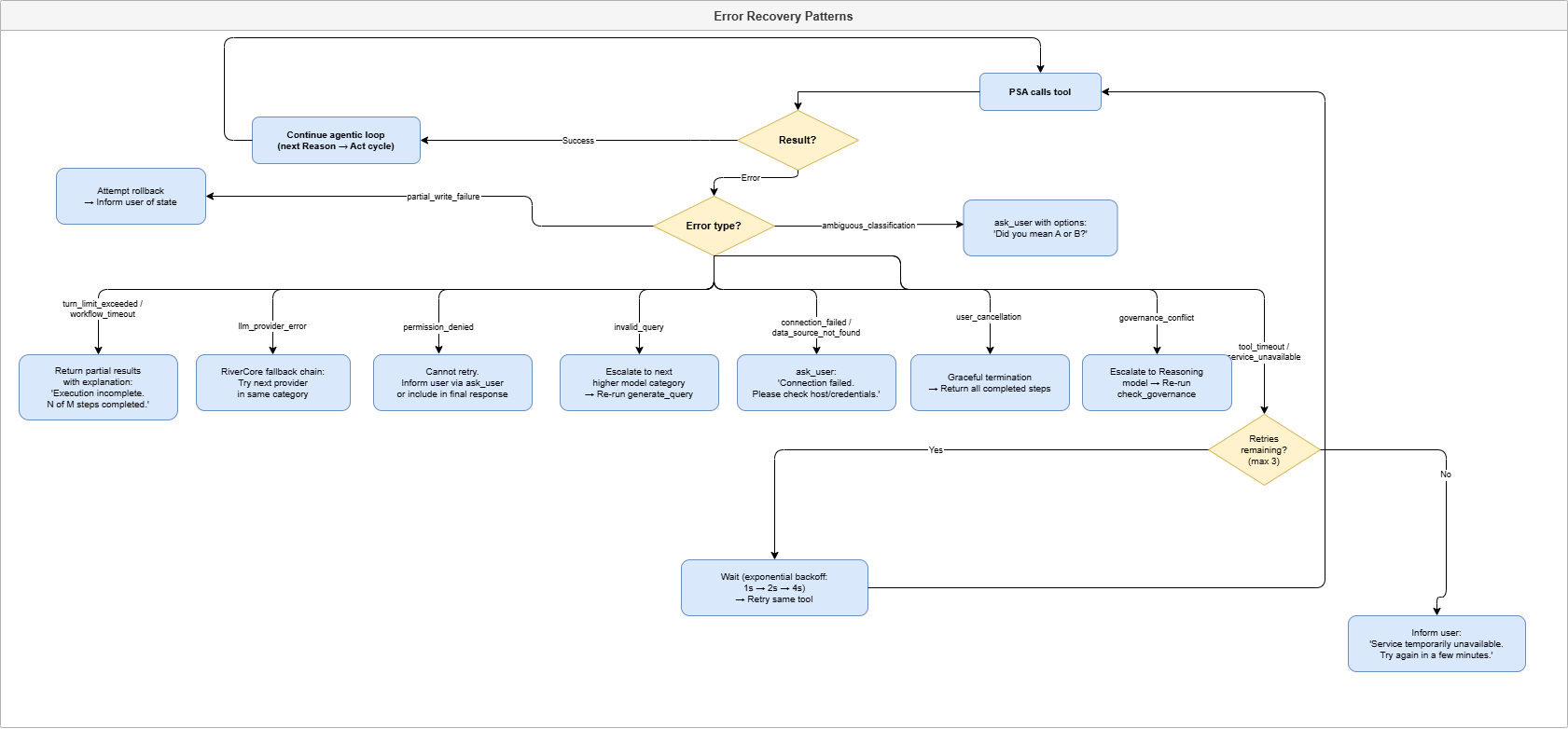
PSA operates in a dynamic multi-step environment. Its resilience is built on a specific error taxonomy and predefined recovery patterns.
Error Taxonomy
| Error Type | Source | Example Scenario | Severity | Retriable |
|---|---|---|---|---|
permission_denied | TLO Gateway | User lacks data_source:delete | Blocking | No |
tool_timeout | Execution tool | Query execution exceeds 120s | Recoverable | Yes (3x) |
service_unavailable | Backend | Port :8005 is unreachable | Recoverable | Yes (3x + Backoff) |
invalid_query | generate_query | Syntax error in produced SQL | Recoverable | Yes (Escalate model) |
connection_failed | test_connection | Target database host is down | Non-retriable | No (Ask User) |
governance_conflict | check_governance | RLS rules contradict masking policy | Escalatable | Yes (Reasoning model) |
user_cancellation | ask_user | User declines a required confirmation | Terminal | No |
turn_limit_hit | Agentic loop | Agent exceeds 15 reasoning turns | Terminal | No |
Recovery Patterns
- Retry Pattern: For
tool_timeoutorservice_unavailable, PSA retries up to 3 times with exponential backoff (1s -> 2s -> 4s). - Escalation Pattern: For
invalid_queryorgovernance_conflict, PSA escalates the turn to the Reasoning category to analyze and re-evaluate the plan. - Interaction Pattern: For
connection_failedorambiguous_classification, PSA callsask_userto gather manual clarification or valid credentials. - Graceful Termination: For
permission_deniedoruser_cancellation, PSA returns all completed step data with a final report explaining why subsequent steps were skipped.
PSA Tool Specifications
All PSA tools utilize strict Pydantic JSON schemas. If a tool response fails validation, PSA triggers a retry turn with an escalated model.
Tool: classify_intent (RiverPlan)
Classifies the natural language prompt into a structured intent and action type.
{
    "intent_type": "DATA_QUERY",
    "intent_summary": "Aggregation of customer revenue",
    "is_compound": true,
    "secondary_intents": ["GOVERNANCE_MANAGEMENT"],
    "intent_graph": {
        "execution_order": "sequential",
        "steps": [
            {"step_id": 1, "intent": "DATA_QUERY", "depends_on": []},
            {"step_id": 2, "intent": "GOVERNANCE", "depends_on": [1]}
        ]
    },
    "compound_confidence": 0.93,
    "ambiguity_flag": false
}
Tool: check_governance (RiverGuard)
Evaluates permissions and generates RLS filters and masking rules.
{
    "action_permitted": true,
    "row_filters": ["customers.region = 'West'"],
    "column_masking_rules": [
        {
            "column": "customers.ssn",
            "condition": "always",
            "masking_function": "partial_mask(last_4)",
            "description": "Show last 4 digits only"
        }
    ],
    "requires_approval": true,
    "partial_execution_possible": true
}
Tool: generate_query (RiverPlan)
Constructs dialect-optimized SQL/NoSQL with governance applied.
{
    "data_source_id": 1,
    "compute_engine": "PostgreSQL",
    "query": "SELECT id, name FROM customers WHERE region = 'West'",
    "query_type": "select",
    "strategy": "pushdown",
    "explanation": "Standard query with regional RLS filter applied."
}
Concrete Integration Examples
The following scenarios demonstrate PSA's agentic reasoning across single and compound intents.
Example 1: Simple Data Query (3 Turns)
- User: "Show top 10 customers by revenue"
- Turn 1:
classify_intent-> DATA_QUERY, needs aggregation + join. - Turn 2:
check_governance-> RLS: region='West', masking: SSN partial. - Turn 3:
generate_query-> SQL with governance filters applied. - Outcome: Return query + Table/Bar chart visualization to frontend.
Example 2: Data Source Discovery (6 Turns)
- User: "Connect to my PostgreSQL at billing-db.company.com and discover the schema"
- Turn 1:
classify_intent-> DATA_SOURCE_MGMT + DATA_DISCOVERY. - Turn 2:
ask_user-> "Please provide the database password." - Turn 3:
create_data_source-> TLO Validates -> Backend :8005 -> ID=15. - Turn 4:
test_connection(ID=15)-> [SUCCESS]. - Turn 5:
discover_schema(ID=15)-> 25 tables found. - Outcome: Returns full schema tree to UI.
Example 3: Compound Query + Write-Back (8 Turns)
- User: "Find customers with churn > 0.8 and write IDs to retention_list"
- Logic: Sequential Execution (Write depends on Query results).
- Turn 1:
classify_intent-> Compound (DATA_QUERY + ACTION_EXECUTION). - Turn 4:
execute_query-> Returns 142 rows. - Turn 6:
ask_user (confirmation)-> "This will update 142 rows. Proceed?" - Turn 7:
write_back-> TLO Validates token -> Data Orch :8002. - Outcome: Confirm 142 rows inserted into target table.
Example 4: Governance Action (4 Turns)
- User: "Apply column masking to SSN in customers table"
- Turn 1:
classify_intent-> GOVERNANCE_MGMT. - Turn 3:
ask_user (confirmation)-> "Apply partial masking to SSN for all users?" - Turn 4:
apply_governance_policy-> Policy created in Backend. - Outcome: Column SSN now masked in all subsequent queries.
Example 5: Partial Permission Denial (5 Turns)
- User: "Query data and create an RLS policy for region='East'"
- Logic: Analyst role has Query but NOT Policy:Create.
- Turn 2:
check_governance-> DATA_QUERY [OK], GOVERNANCE [DENIED]. - Turn 3:
ask_user-> "You lack policy permissions. Proceed with query only?" - Turn 4: User confirms -> PSA executes Query only.
- Outcome: Results returned; Governance step marked [SKIPPED].
Example 6: Parallel Platform Lookups (4 Turns)
- User: "Show workspace members and storage usage"
- Logic: Parallel Execution (No data dependency).
- Turn 3: PSA calls
get_workspace_infoandget_storage_infoconcurrently. - Outcome: UI renders Member list and Storage chart.
Example 7: Complex Multi-Intent Federation (10 Turns)
- User: "Join Salesforce contacts with PG orders and explain the growth"
- Logic: Sequential (Discovery) -> Parallel (Reads) -> Sequential (Join + Explainer).
- Outcome: Multi-source JOIN executed via hybrid strategy; narrative report generated.
Example 8: Backend-Enforced Safety Net (6 Turns)
- User: "Delete the staging database connection"
- Logic: PSA skips
ask_userreasoning error. - Turn 3: PSA calls
delete_data_source-> TLO catches no-token call. - Turn 4: TLO triggers mandatory confirmation popup via WebSocket.
- Outcome: Backend deletes only AFTER TLO receives the user's manual approval.
Example 9: Error Recovery - Model Escalation (4 Turns)
- User: "Complex query with nested window functions"
- Turn 1:
generate_query(Balanced) -> SQL Syntax Error. - Turn 2: PSA analyzes error -> Escalates to Reasoning category (o3/Opus).
- Turn 3:
generate_query(Reasoning) -> Generates valid complex SQL.
Example 10: Multi-Step Credential Gathering (7 Turns)
- User: "Setup Snowflake and run discovery"
- Turn 2:
ask_user-> Requests Host/Account. - Turn 4:
ask_user-> Requests Token/Password. - Outcome: Connection stored and schema discovered.
Sample Response Payloads
Compound Success (Query + Write)
{
    "status": "success",
    "is_compound": true,
    "intent_summary": "Find high-churn customers and write to retention list",
    "compound_results": [
        {
            "step": 1,
            "intent": "DATA_QUERY",
            "status": "success",
            "query_result": { "rows_returned": 142, "data": "[...]" }
        },
        {
            "step": 2,
            "intent": "ACTION_EXECUTION",
            "status": "success",
            "action_result": { "rows_affected": 142, "operation": "INSERT" }
        }
    ],
    "ai_metadata": { "turns": 8, "total_cost_usd": 0.0058 }
}
Partial Success (Permission Denied)
{
    "status": "partial_success",
    "is_compound": true,
    "compound_results": [
        { "step": 1, "intent": "DATA_QUERY", "status": "success" },
        {
            "step": 2,
            "intent": "GOVERNANCE",
            "status": "skipped",
            "error": "insufficient_permissions"
        }
    ]
}
LLM Agent Configuration
The PSA agent is configured with high-level system instructions and a dynamic provider fallback chain.
System Instructions (Summary)
- Role: You are PSA, the dynamic orchestrator for RiverGen.
- Loop: You operate in a Reason -> Act -> Observe loop.
- Security: ALWAYS check governance via
check_governancebefore execution. - Safety: ALWAYS confirm destructive actions via
ask_useror obtain aconfirmation_token. - Transparency: Report all model turn categories and token costs in
ai_metadata.
Provider Mappings
| Category | Primary Provider | Fallback 1 | Fallback 2 |
|---|---|---|---|
| Fast | OpenAI (GPT-4o-mini) | Gemini (Flash Lite) | Anthropic (Haiku) |
| Balanced | Gemini (Flash) | OpenAI (GPT-4o) | Anthropic (Sonnet) |
| Reasoning | Anthropic (Opus) | OpenAI (o3) | Gemini (Pro) |
| Coding | DeepSeek (V3) | OpenAI (GPT-4o) | Anthropic (Sonnet) |
Related
- (c) 2026 RiverGen. Confidential - For Internal Documentation and Technical Integration.*