Prompt Studio (PSA) Overview
Page Outline
This page provides the comprehensive technical specification, architectural diagrams, and service interactions for the Prompt Studio (PSA) dynamic orchestrator.
Overview
Prompt Studio (PSA) is the flagship intelligence orchestrator of the RiverGen Stack. It enables users to execute complex operations--including database queries, schema administration, and governance enforcement--using natural language interfaces.
PSA operates through a continuous agentic loop (Reason -> Act -> Observe). It dynamically selects the optimal tool sequence to achieve a user's objective, rather than following a static, pre-defined execution pipeline.
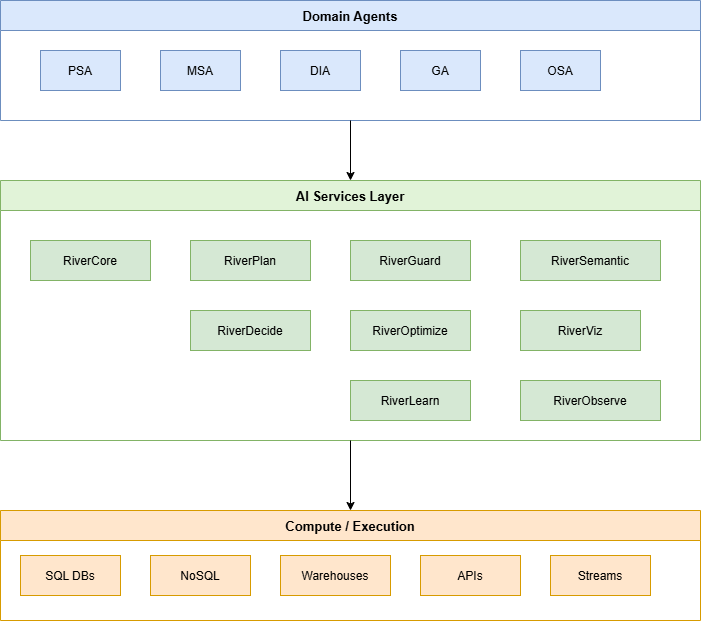
The service is integrated directly with the Top-Level Orchestrator (TLO). This ensures that every tool call and data access request is validated against the user's active Access Control Lists (ACL) in real-time.
Use Cases
PSA provides the primary automation layer for technical teams who need to interact with heterogeneous data systems through specialized AI reasoning.
- Intelligent Data Research: querying cross-system datasets (SQL, NoSQL, and Object Storage) using context-aware natural language.
- Governed Administration: creating or modifying data sources and schema structures with automated policy and safety checks.
- Workflow Automation: building multi-step sequences that involve data retrieval, transformation, and automated write-back to production systems.
- Compliance Monitoring: scanning data environments for sensitive patterns and applying RLS or masking policies via natural language commands.
Inputs
The PSA service accepts structured execution requests via the TLO Gateway. The following table defines the core parameters required for successful reasoning and action.
| Field | Type | Required | Description |
|---|---|---|---|
prompt_text | string | Yes | The natural language user instruction or SPL-enhanced command. |
workspace_id | uuid | Yes | The target environment identifier for context resolution. |
data_source_ids | array[uuid] | No | Optional list of specific database IDs to scope the search. |
user_context | object | Yes | Enriched metadata including roles, claims, and organization attributes. |
options.temperature | float | No | Reasoning randomness; defaults to 0.0 for deterministic execution. |
Outputs
The service yields asynchronous progress updates and a final structured result payload upon successful task completion.
| Field | Type | Description | Example Value |
|---|---|---|---|
execution_id | uuid | Unique ID for tracking the asynchronous Temporal workflow. | 550e8400-e29b-41d4-a716-446655440000 |
intent_type | enum | The system-classified intent (e.g., DATA_QUERY, GOVERNANCE). | ACTION_EXECUTION |
final_data | object | The formatted output, representing either results or status. | {"status": "success", "rows": 125} |
trace_log | array | Sequence of reasoning steps and tool calls performed. | ["classify", "generate_query", "execute"] |
confidence | float | Probability rating of the execution plan validity. | 0.995 |
Model Behavior
PSA utilizes an agentic loop design. This allows the orchestrator to reason iteratively, calling specialized tools and adapting to their results before concluding the task.
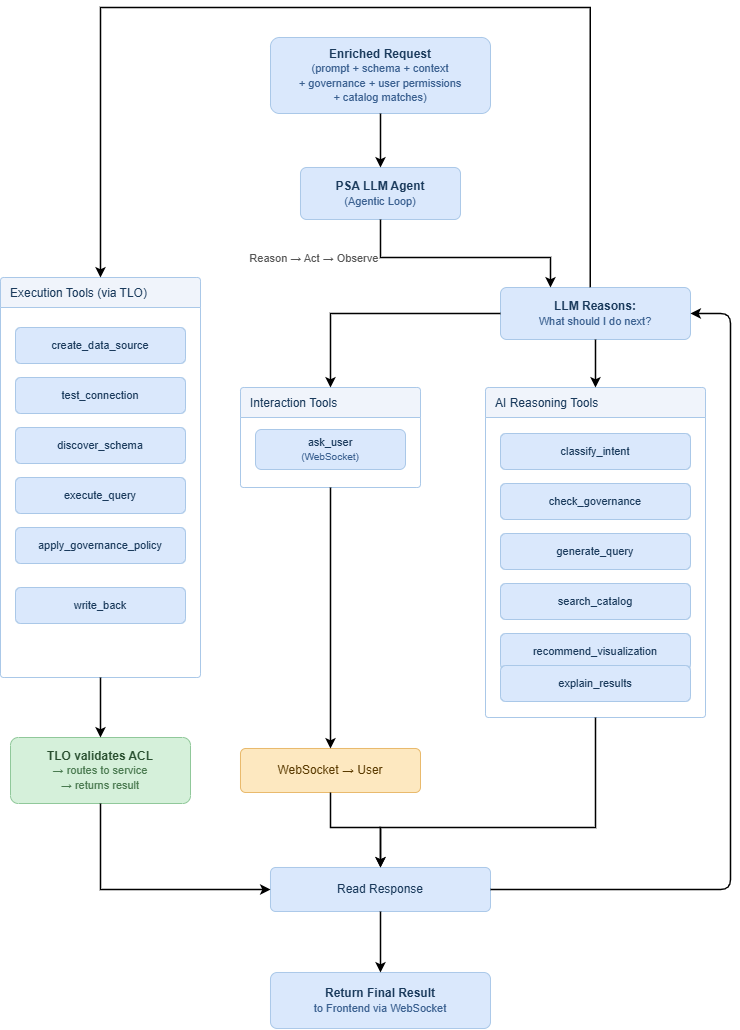
- Information Enrichment: PSA fetches relevant metadata, including schemas and governance policies, to build an exhaustive reasoning context.
- Intent Branching: The
classify_intenttool maps the request to one of the nine active intent types, determining the subsequent tool inventory. - Iterative Reasoning: The model calls tools (e.g.,
search_catalogorask_user), reads their outputs, and updates its internal state for the next step. - Final Delivery: Once the reasoning concludes that the objective is met, the system packages the results and transmits an "execution_complete" message.
Configuration Options
Administrators manage service behavior via the RiverCore configuration layer. These settings determine model selection strategies and safety thresholds.
| Parameter | Default | Category | Description |
|---|---|---|---|
routing_strategy | balanced | RiverCore | Determines the default provider chain (Gemini, OpenAI, etc). |
model_per_turn | true | RiverPlan | If true, selects the best model category for every reasoning turn. |
safety_level | strict | RiverGuard | Controls the sensitivity of the governance rejection layer. |
max_loop_count | 10 | Orchestrator | Limits the number of agent turns to prevent infinite loops. |
Integration Guide
To integrate PSA, services must communicate exclusively through the Top-Level Orchestrator (TLO) Gateway.
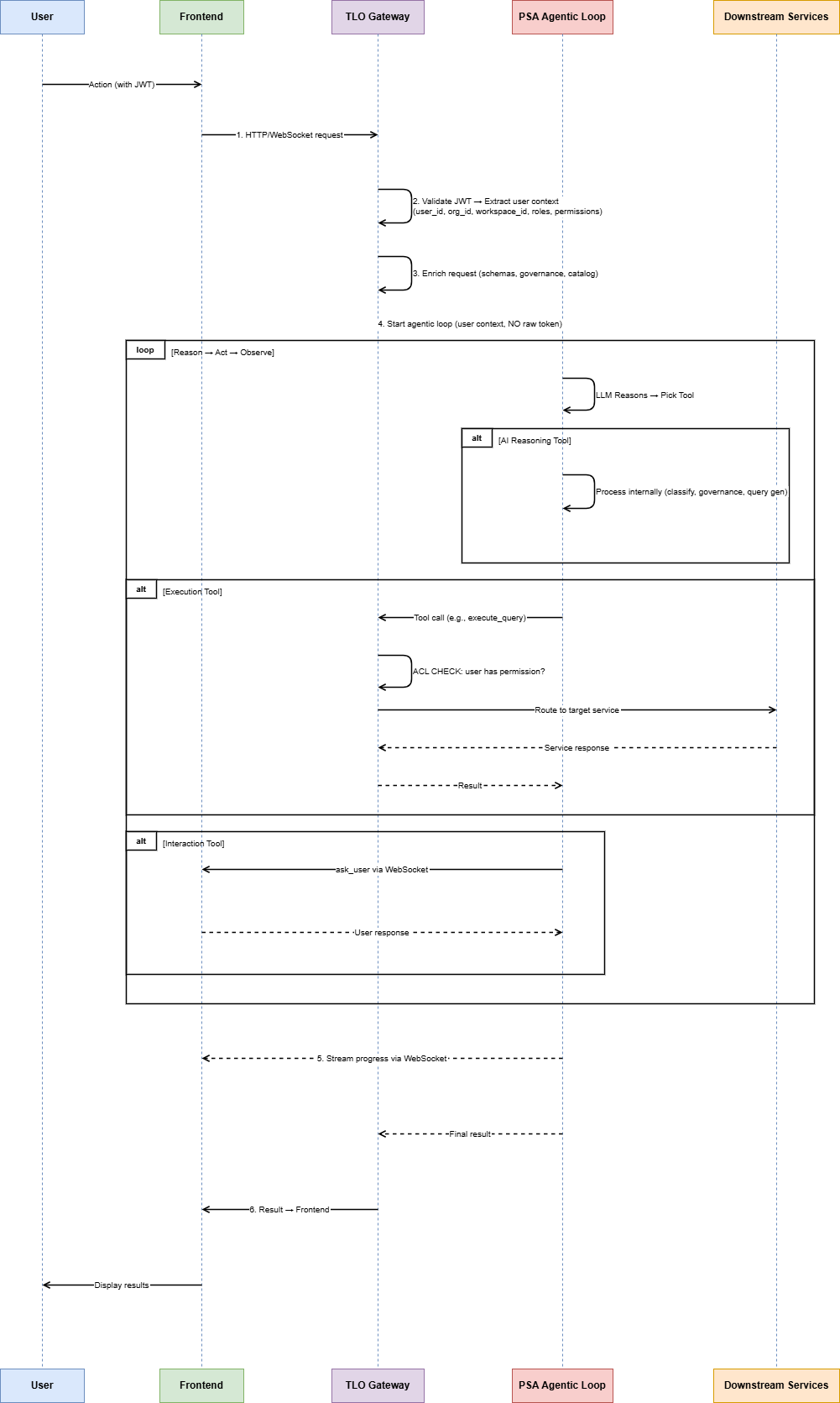
1. Unified Authentication
Establish a connection by providing a JWT in the Authorization header. This token must include the user's workspace and role claims for ACL validation.
curl -X POST https://api.rivergen.local/tlo/v1/prompts/execute \
  -H "Authorization: Bearer <token>" \
  -d '{"prompt_text": "List billing tables"}'
2. Bidirectional WebSocket UI
PSA often requires interactive input (e.g., for missing passwords or confirmations). Integrations must listen for the ask_user tool call on the WebSocket.
const ws = new WebSocket("ws://api.rivergen.local/ws/executions/{id}");
ws.onmessage = (event) => {
  const data = JSON.parse(event.data);
  if (data.type === "user_interaction_required") {
    handlePromptClarification(data.payload);
  }
};
3. Execution Sequencing
The following diagram illustrates the complete end-to-end flow from user input to result delivery.
Cost and Performance
PSA performance is determined by the number of reasoning turns and the latency of the underlying LLM provider.
- Turn Latency: Each reasoning turn typically takes 1.2 to 2.5 seconds depending on the selected model category.
- Workflow Duration: Simple queries resolve in under 5 seconds, while multi-step management tasks may take 15 to 30 seconds.
- Token Handling: Context window management is handled by RiverCore to optimize token usage and cost across provider boundaries.
Limitations and Known Issues
Implementers should account for the following constraints during system design and deployment.
- Schema Scalability: Processing schemas with more than 5,000 entities may increase classification latency significantly.
- Ambiguity Blocks: if a prompt is too vague, PSA may enter an interaction loop (
ask_user) or fail if no intent is matched. - Dependency Serialization: PSA executes steps within a loop; it cannot currently parallelize independent tool calls in a single turn.
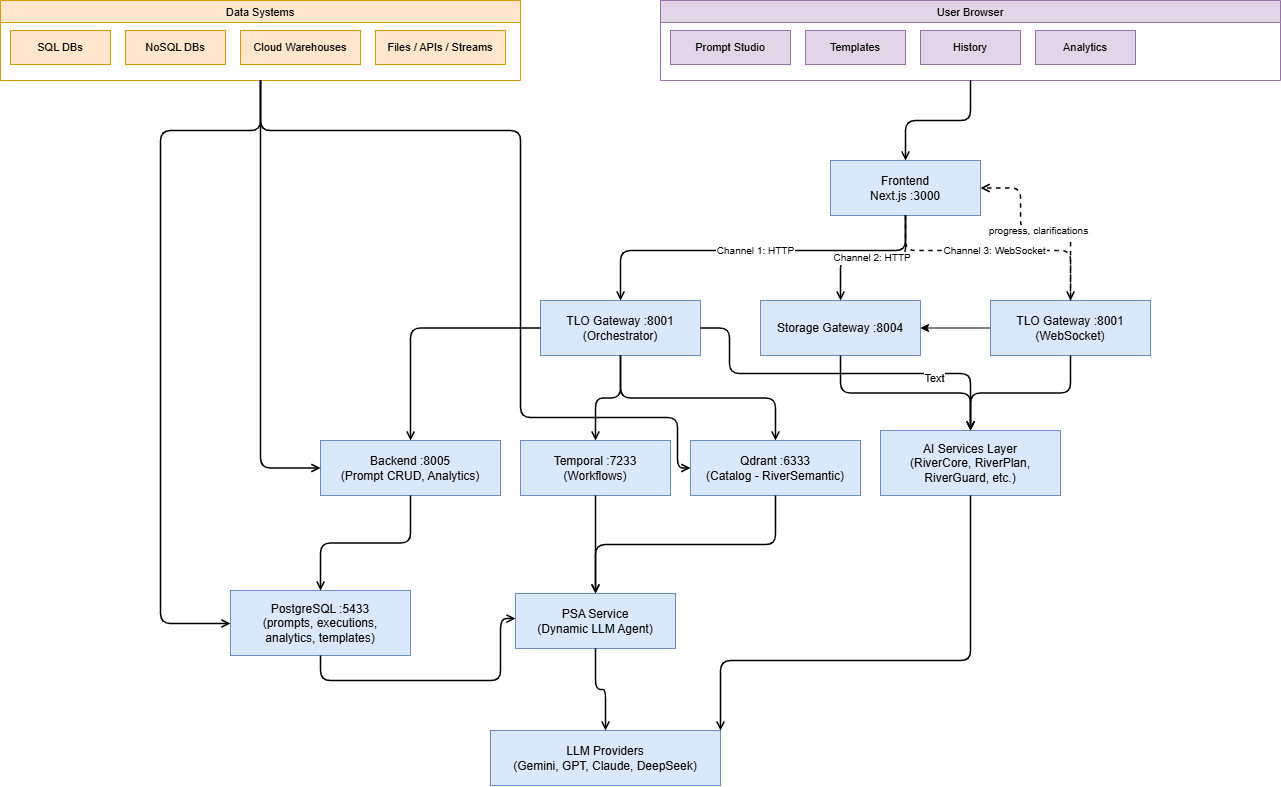
Technical Architecture
The PSA architecture is divided into clear functional layers to ensure modularity and security.
RiverGen Intelligence Stack Mapping
PSA coordinates with several parent agents and sub-services to provide a unified intelligence layer.
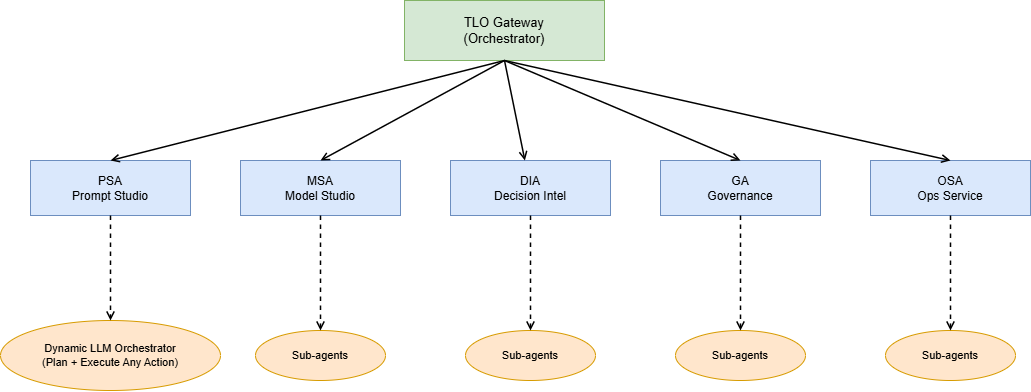
| Agent | Scope | Role in PSA Flow |
|---|---|---|
| GA | Governance | Validates all execution tools against RBAC/RLS policies. |
| MSA | Model Studio | Provides trained models for specific intent types. |
| OSA | Operations | Manages connector connectivity and retry logic. |