Sample Prompts and SPL Keywords
Page Outline
This guide provides an exhaustive list of supported natural language prompt patterns, Structured Prompt Language (SPL) keywords, and intent classification rules.
Overview
Prompt Studio (PSA) uses a transformer-based reasoning engine to map natural language intents to technical actions. Efficiency is maximized when users provide declarative hints via Structured Prompt Language (SPL).
The system classifies every input into a specific intent category during the first turn of the agentic loop. This classification determines which downstream services (e.g., RiverPlan, RiverGuard) are invoked to fulfill the request.
Use Cases
Developers and data stakeholders use the following combinations of natural language and SPL to automate complex data lifecycle events.
- Federated Data Access: Joining datasets across PostgreSQL and MongoDB using natural language "join" intents.
- Governed Administration: Applying security policies like column masking or RLS through interactive prompt sessions.
- Automated Lifecycle Management: Training and deploying ML models from raw datasets using automated "train" and "deploy" intents.
- Operational Auditing: Querying system telemetry and audit logs to track specific user or platform actions.
Intent Classification Reference
The following tables describe the active and pending intent types recognized by the PSA reasoning engine.
Active Intent Categories
| Intent Type | Purpose | Example Prompt |
|---|---|---|
DATA_QUERY | Analytical retrieval and joins. | "Show monthly revenue trends." |
DATA_DISCOVERY | Schema and catalog exploration. | "List tables in the billing DB." |
DATA_SOURCE_MG | Connector and source registration. | "Register my S3 analytics bucket." |
ACTION_EXECUTE | Write-backs and notifications. | "Write churn scores to PostgreSQL." |
GOVERNANCE_MG | Security and policy management. | "Apply RLS to the customers table." |
OBSERVABILITY | Audit and health monitoring. | "Show audit trail for model v3." |
STORAGE_MG | File and object management. | "Show my workspace storage usage." |
WORKSPACE_ADMIN | Identity and settings management. | "List members of this workspace." |
PLATFORM_EXPL | Platform feature assistance. | "How do I add a data source?" |
Pending Intent Categories (Technical Preview)
The following categories are recognized by the model but require underlying service finalization for full execution.
| Intent Type | Associated Service | Description |
|---|---|---|
MODEL_BUILD | Model Studio | Triggering new ML training jobs. |
MODEL_UPDATE | Model Studio | retrain or tune existing models. |
MODEL_EVAL | Model Studio | Evaluate model performance metrics. |
MODEL_DEPLOY | Model Studio | Promote models to production. |
MODEL_MONITOR | Model Studio | Monitor prediction and data drift. |
FEATURE_ENG | Model Studio | Build specific ML features. |
MATERIALIZE | Scheduling | Create views or scheduled snapshots. |
DECISION_WF | Decision Engine | Build conditional decision graphs. |
SCHEDULING | Scheduling | Schedule recurring tasks and alerts. |
Sample Prompts: Category Reference
The following sections provide concrete examples of natural language prompts categorized by their functional domain.
A. Data Source Management
- "Connect to my PostgreSQL database at billing.company.com using SSL"
- "Add a new Salesforce connector using OAuth authentication"
- "Register the S3 bucket s3://analytics-data in us-east-1"
- "Test the connection for the production billing database"
- "Update the API credentials for the Snowflake warehouse"
- "Delete the staging data source as it is no longer required"
- "Add a MongoDB data source at mongo.internal:27017/events"
B. Schema Discovery and Exploration
- "List all connected data sources in this workspace"
- "Find tables related to billing, subscriptions, and invoices"
- "Show all columns for the customer_profiles table"
- "Preview the first 100 rows from the transactions dataset"
- "Identify the primary keys for all tables in the marketing DB"
C. Analytics and Aggregation
- "Count total orders grouped by current status"
- "Calculate the average revenue per customer for 2024"
- "What is the total sales amount for the West region?"
- "Find the top 5 products based on unit sales volume"
- "Show revenue trends over the last 6 months with growth rates"
- "Compare sales performance across regions year-to-date"
- "Calculate the customer churn rate for the current quarter"
D. Data Federation
- "Show orders with customer names and shipping addresses"
- "Join PostgreSQL customers with MongoDB order totals"
- "Compare Snowflake revenue with Salesforce pipeline data"
- "Pull user events from Kafka and join with SQL profiles"
E. Governed Write-Back and Actions
- "Update customer tier in Salesforce based on revenue metrics"
- "Write the churn probability scores to the customers table"
- "Insert flagged transactions into the compliance review table"
- "Trigger a Slack alert when the daily error rate exceeds 5 percent"
- "Update the region for customers where city is 'San Francisco'"
SPL: Structured Prompt Language
SPL provides a declarative syntax for optimizing PSA execution. Using SPL bypasses discovery turns in the agentic loop, leading to faster results.
Entity Keywords (@)
| Keyword | Entity Type | Example |
|---|---|---|
@connector | Protocol reference | @connector postgres |
@source | Saved data source | @source billing_db |
@dataset | Scoped table/asset | @dataset customers |
@model | ML model reference | @model churn_v3 |
@workspace | Environment group | @workspace analytics |
Action Keywords (/)
| Keyword | Primary Intent | Description |
|---|---|---|
/connect | DATA_SOURCE_MG | Register a new system connection. |
/query | DATA_QUERY | Perform analytical data retrieval. |
/mask | GOVERNANCE_MG | apply column-level security filters. |
/write | ACTION_EXECUTE | Execute a governed write operation. |
/audit | OBSERVABILITY | Query action and execution logs. |
Configuration Modifiers
| Modifier | Effect | Description |
|---|---|---|
environment | Execution scope | Targets production, staging, or dev. |
window | Time boundary | Binds prompt to last_7_days, 2024-Q1, etc. |
permissions | Access level | Sets transient level like read_only. |
Template and Governance Variables
PSA supports dynamic variable substitution for automated workflows and secure policy enforcement.
Template Variable Types
string:"Show top users in {{region}}"number:"Display {{count}} records"date:"Filter after {{start_date}}"list:"Include statuses in {{status_list}}"
Governance Placeholders
{user_id}: Resolves to the current user's ID.{workspace_id}: Resolves to the active workspace GUID.{user.attributes.key}: Resolves to specific JWT claims.
Query Generation Examples
PostgreSQL with RLS and Masking (Pushdown-First)
Prompt: "Show top 10 customers by revenue"
WITH filtered_data AS (
    SELECT
        customer_id,
        CASE WHEN email IS NOT NULL THEN '***@' || split_part(email, '@', 2) END as masked_email,
        sum(order_total) as total_rev
    FROM orders
    WHERE region = '{user.attributes.assigned_region}'
    GROUP BY customer_id, email
)
SELECT * FROM filtered_data ORDER BY total_rev DESC LIMIT 10;
Model Behavior: The Agentic Loop
PSA does not follow a linear plan. It reasons iteratively, making tool decisions based on intermediate data results.
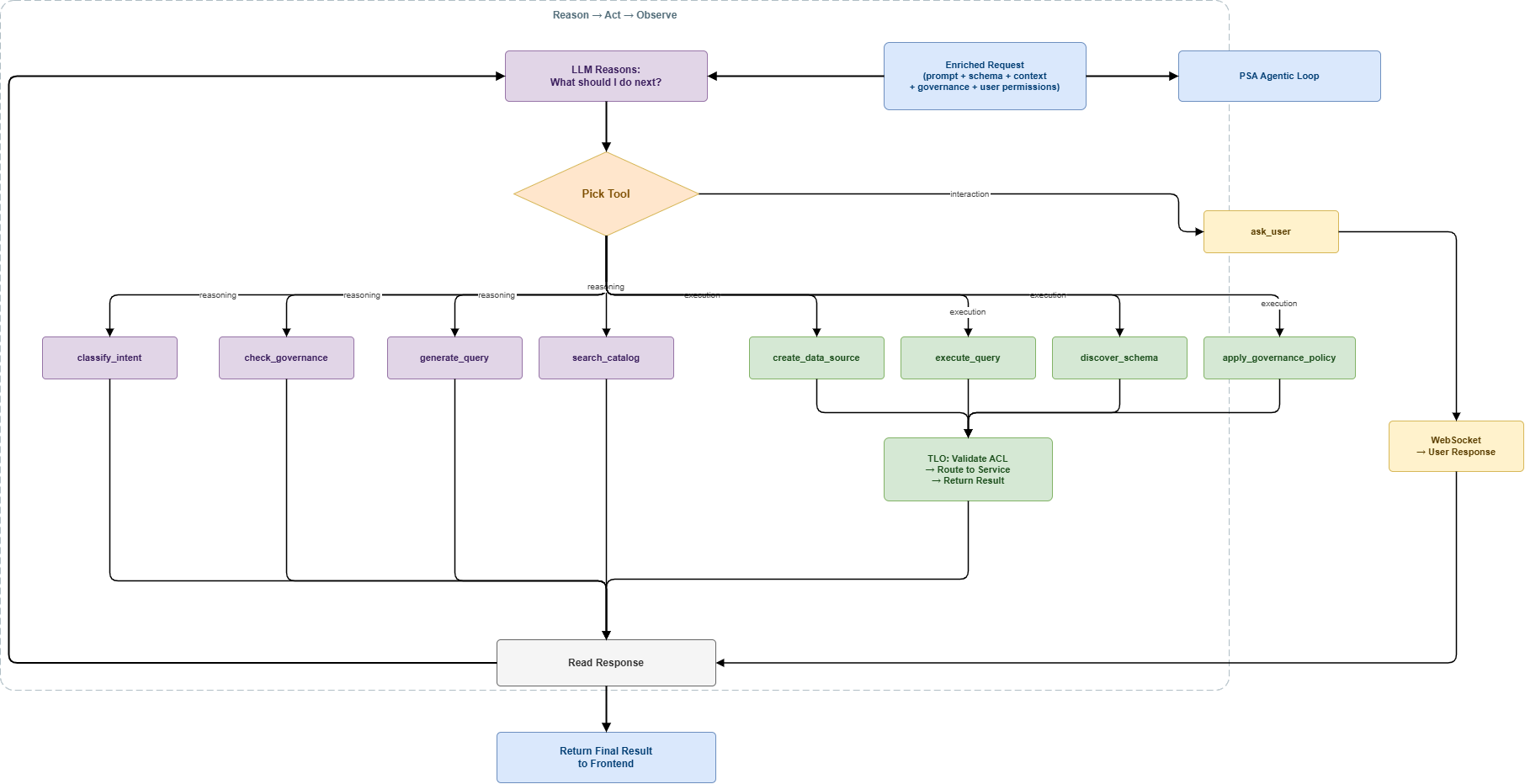
- Classification: Identify intent and SPL entities.
- Context Packager: Fetch relevant schemas from RiverSemantic.
- Execution Execution: TLO validates ACL and fires the pushdown query.
- Result Explanation: RiverViz generates charts and narrative summaries.
Limitations and Constraints
- Recursive Loops: The system is limited to 10 reasoning turns per prompt execution.
- Entity Collision: SPL keywords must match exact backend identifiers.
- Credential Safety: Sensitive inputs are gathered via secure WebSocket (
ask_user) and never logged in plain text.