Model Studio Overview
This page provides the comprehensive technical specification, architecture, and lifecycle workflows for the Model Studio automated machine learning factory.
Overview
Model Studio serves as the primary intelligence factory within the RiverGen ecosystem, providing a unified platform for automated machine learning (AutoML). It manages the entire model lifecycle from task intent submission through data preprocessing and algorithm selection to final inference deployment.
The service is designed to democratize machine learning by providing a low-code environment where complex data science processes are encapsulated within a secure, scalable architecture. It allows developers to focus on business logic rather than the underlying mathematical complexities of training and deploying predictive models.
Use Cases
Model Studio is utilized for various predictive and classification tasks across the platform telemetry and application layers.
- Automated Prediction Workflows: Training models to predict customer churn, revenue trends, or system anomalies from telemetry data.
- Dynamic Variable Scaling: Automatically normalizing and encoding diverse datasets for consistent algorithm performance.
- Model Registry Management: Versioning and deploying model artifacts into production environments without manual intervention.
- Performance Evaluation: Running Champions vs. Challengers simulations to identify the most accurate algorithm for a specific task.
Architectural Foundation
Model Studio is built on a modular micro-service architecture that separates concerns between API gateways, business logic, and durable storage layers.
- High-Level Architecture
- Data Processing Pipeline
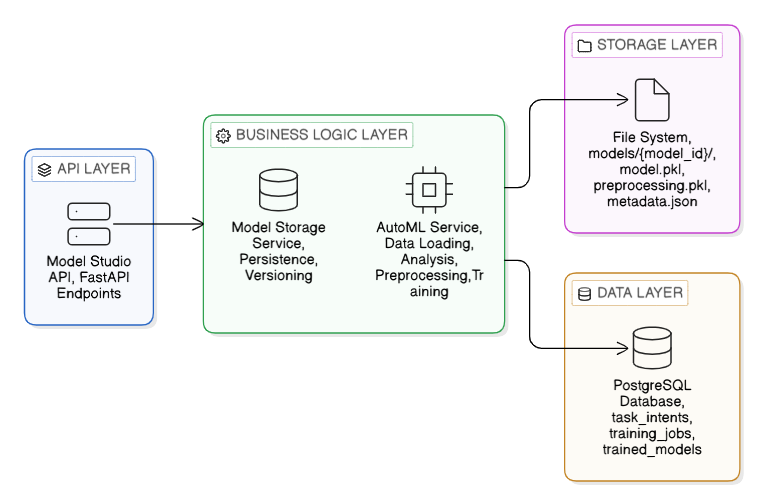
The architecture follows a layered strategy. The API Layer handles request validation, the Business Logic Layer drives the AutoML and Storage services, and the Data and Storage layers ensure metadata persistence and artifact durability.

The pipeline handles high-speed ingestion and intelligent analysis of technical telemetry, automatically detecting data types and applying adaptive preprocessing strategies.
Model Behavior: The Intelligence Engine
The core logic of Model Studio is contained within the AutoML engine, which handles the complex decisions of feature engineering and algorithm selection.
- Intelligent Analysis: The system performs comprehensive profiling to identify column types, missing value distributions, and statistical characteristics.
- Adaptive Preprocessing: Based on the analysis, the engine applies imputation for missing values and encoding (One-Hot or Label) for categorical variables.
- Automated Algorithm Selection: The system dynamically chooses the most suitable algorithm (e.g., XGBoost, Random Forest, or LightGBM) based on dataset volume and feature sparsity.
- Validation and Evaluation: Models are trained using standard train/test split strategies and evaluated against metrics such as Accuracy, Precision, Recall, or RMSE.
Training Lifecycle: Inputs and Outputs
The training flow is asynchronous, allowing for heavy computational processing without blocking API responses.
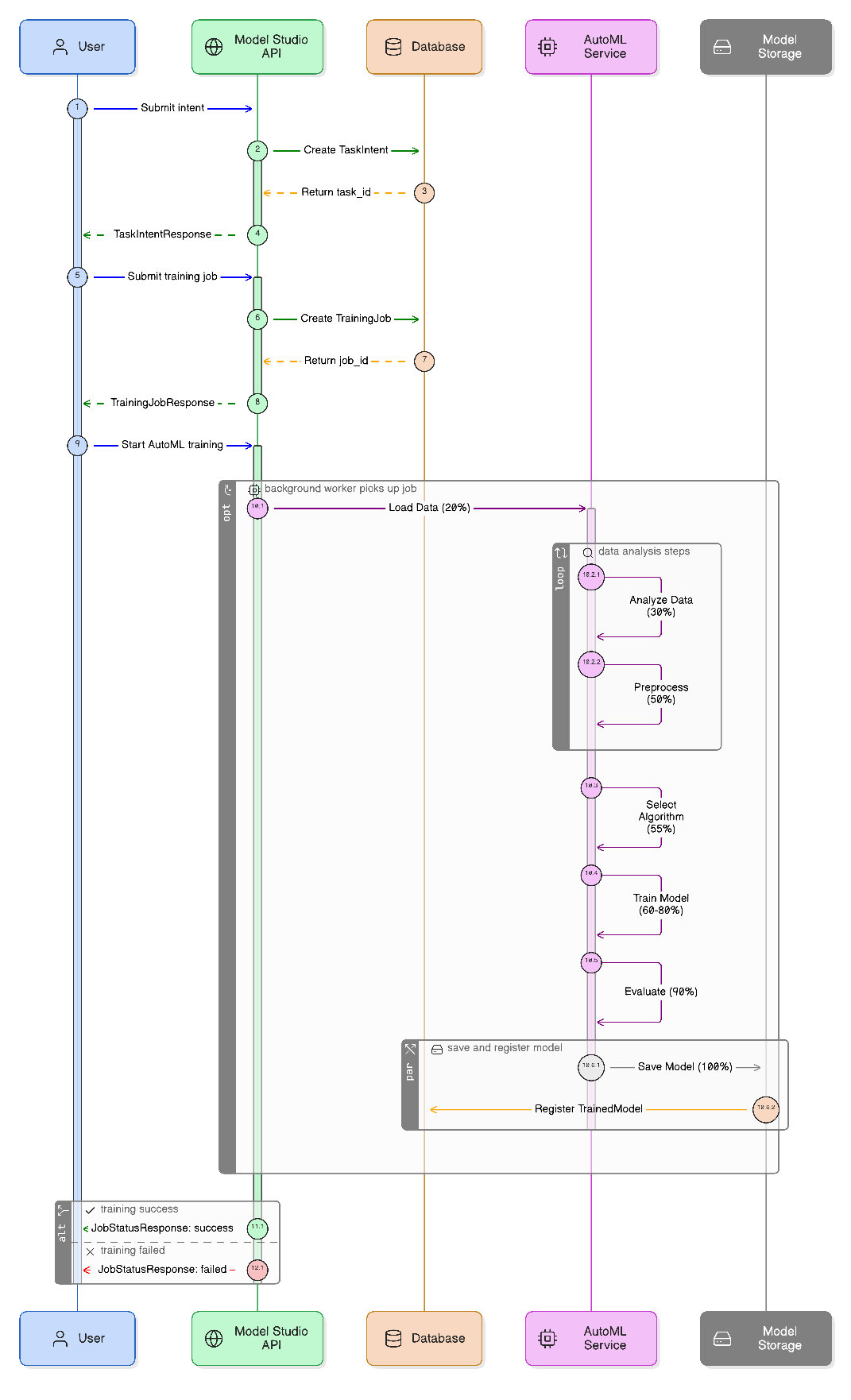
Input Metadata
- Task Intent: Specifies the data source, target variable, and problem type (Classification or Regression).
- Training Frequency: Defines whether the model should be a one-off run or a recurring scheduled job.
Output Artifacts
- Model Pickle (model.pkl): The serialized algorithm state ready for inference.
- Preprocessing Pipeline (preprocessing.pkl): The exact transformations required for new input data.
- Metadata JSON: Detailed performance metrics and feature importance logs.
Inference (Prediction) Flow
Once models are active, they provide instantaneous predictions via the high-concurrency Prediction API.
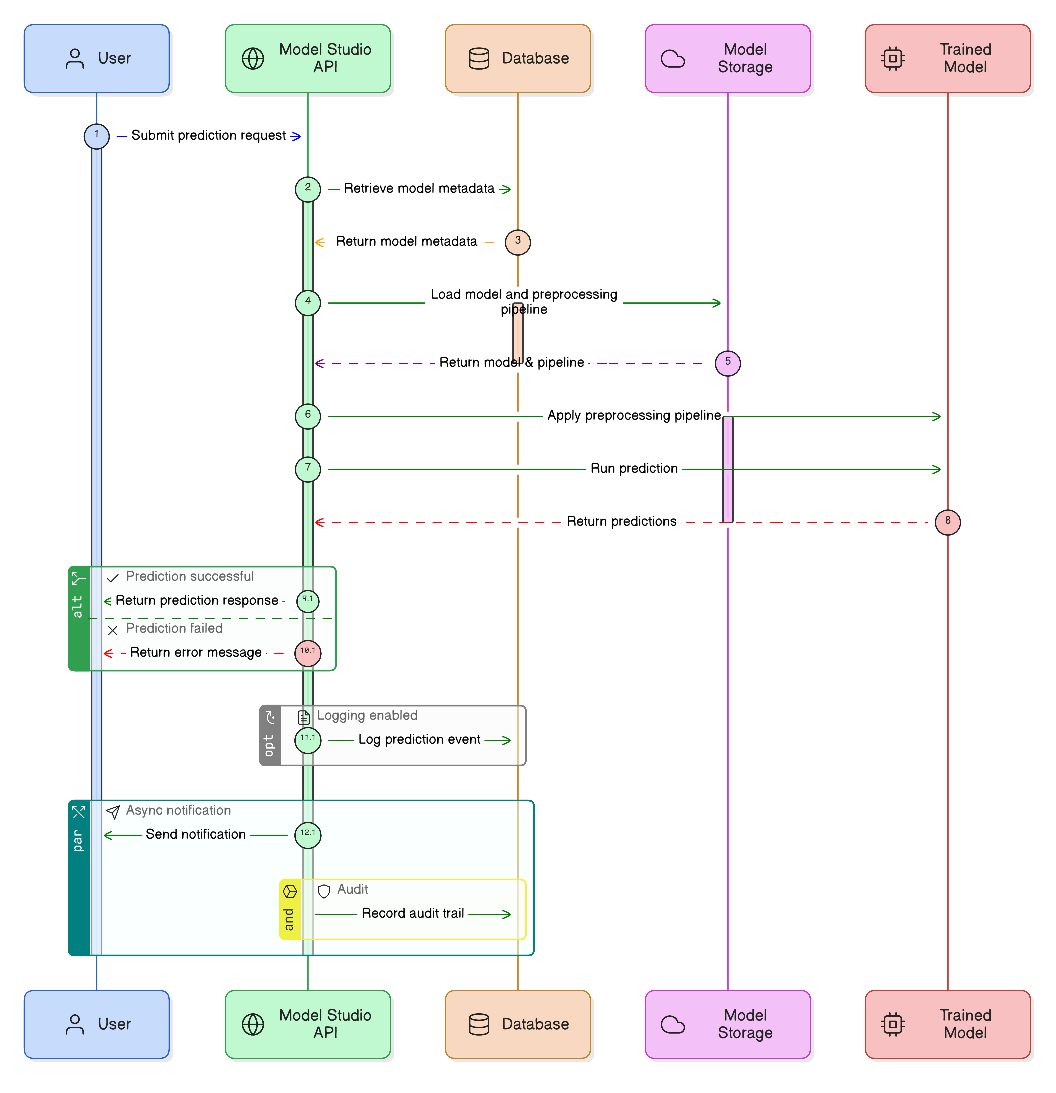
The system ensures that the exact same preprocessing logic from the training phase is applied to the live prediction input to maintain numerical and categorical consistency.
Configuration Options
Administrators can tune the AutoML behavior through service-level parameters.
| Parameter | Type | Default | Description |
|---|---|---|---|
max_training_time | integer | 3600 | Maximum seconds for a single training job before timeout. |
eval_metric | string | accuracy | The primary metric used for internal algorithm comparison. |
test_size | float | 0.2 | The percentage of data reserved for model evaluation. |
use_cache | boolean | true | Enables caching of preprocessed data to speed up repeated runs. |
Technical Implementation Components
The following table maps the functional areas of Model Studio to their respective code manifestations.
| Component | File Path | Purpose |
|---|---|---|
| API Layer | app/api/routes/model_studio.py | Exposes REST and WebSocket endpoints for operations. |
| AutoML Service | app/services/automl_service.py | Core automated machine learning pipeline logic. |
| Model Storage | app/services/model_storage_service.py | Manages artifact persistence and versioning. |
| Database Models | app/db/models/model_studio.py | Defines schemas for Intents and TrainedModels. |
Limitations and System Constraints
- Single Target Restriction: Each model can only support one prediction target (label) per training intent.
- Data Volume Minimums: A minimum of 50 records is required for simple classification; 500 records are recommended for balanced results.
- Missing Value Threshold: Columns with more than 80 percent missing values are automatically dropped during preprocessing.
- Compute Bound: High-concurrency training jobs may require additional worker nodes to avoid queue congestion.