Frontend Integration
Page Outline
This document provides the exhaustive technical specification for the Prompt Studio frontend architecture, including route structures, state management, and real-time WebSocket communication protocols.
Overview
The Prompt Studio frontend is a high-performance React application built using the Next.js App Router. It serves as the primary visual interface for the RiverGen Intelligence Stack, providing a seamless layer for prompt execution, template management, and analytics.
The frontend is architected to communicate exclusively through three secure gateway channels. It never connects directly to the platform backend, ensuring that all traffic is subject to centralized authentication and observability.
Use Cases
The frontend supports diverse technical workflows for data engineers and platform administrators.
- Real-Time Execution Monitoring: Visualizing the agentic reasoning loop through a live Progress Panel with step-by-step tool traces.
- Interactive Decision Clarification: Resolving ambiguities or providing credentials mid-execution via bidirectional WebSocket dialogs.
- Dynamic Result Categorization: Automatically selecting the best visualization (Table, Chart, or Code) based on the structure of the returned dataset.
- Template Lifecycle Management: creating, sharing, and importing declarative prompt templates for recurring platform tasks.
Route Architecture
The application utilizes a hierarchical route structure under the /prompt-studio path to separate functional concerns.
| Route | File Path | Primary Function |
|---|---|---|
/prompt-studio | page.tsx | The core prompt execution and result workspace. |
/prompt-studio/templates | templates/page.tsx | Browsing, searching, and creating prompt templates. |
/prompt-studio/history | history/page.tsx | Execution audit trail with filtering and search. |
/prompt-studio/analytics | analytics/page.tsx | KPI dashboards and query performance visualization. |
Component Reference: Logic and State
Prompt Studio components are modular and state-driven, utilizing localized React hooks for immediate feedback and planned Zustand stores for centralized lifecycle management.
Result Visualization Components
These components handle the rendering of query results returned by the PSA execution engine.
- TableView: A dynamic data grid that auto-generates columns and applies localized formatting for currency, dates, and numbers.
- ChartView: Auto-detects numeric vs. categorical distributions and renders up to three relevant Recharts visualizations (Bar, Pie, or Multi-metric).
- CodeView: Provides a syntax-highlighted environment for inspecting the pure SQL or NoSQL queries generated by the reasoning engine.
Interactive Dialogs and Modals
The UI incorporates several specialized dialogs to handle bidirectional user-interaction requests from the PSA agent.
- ClarificationDialog: triggerred by
clarification_request. Displays a question and options with an optional text input and response countdown. - ConfirmationDialog: Triggered by
confirmation_request. specifically targets high-impact or destructive operations requiring explicit user consent. - InputDialog: Triggered by
input_request. Collects credentials or missing parameters (e.g., passwords, API keys) mid-loop. - DataSourceModal: A multi-select interface for scoping executions to specific platform connectors.
WebSocket Protocol Specification
Real-time communication is managed via Channel 3 on the TLO Gateway. The connection persists for the duration of the agentic loop.
Bidirectional Message Types
| Type | Direction | Payload Description |
|---|---|---|
progress_update | Server -> Client | Current step, percentage, and tool metadata (e.g., "via TLO"). |
clarification_request | Server -> Client | Question, options, and timeout for user disambiguation. |
user_response | Client -> Server | The user's selection or text input to resolve an agent request. |
execution_complete | Server -> Client | Final results, including intent type and visualization data. |
The useExecutionWebSocket Hook
Frontend developers interact with the WebSocket via a custom React hook that exposes state and callback handlers for execution events.
const { isConnected, sendUserResponse } = useExecutionWebSocket({
    executionId: currentId,
    onProgress: (step, progress, desc) => updateProgressPanel(step, progress),
    onClarification: (request) => openClarificationDialog(request),
    onComplete: (result) => renderExecutionResult(result),
    onError: (error) => handleExecutionFailure(error),
});
Gateway Communication Channels
The frontend communicates through three distinct channels to maintain security and operational reliability.
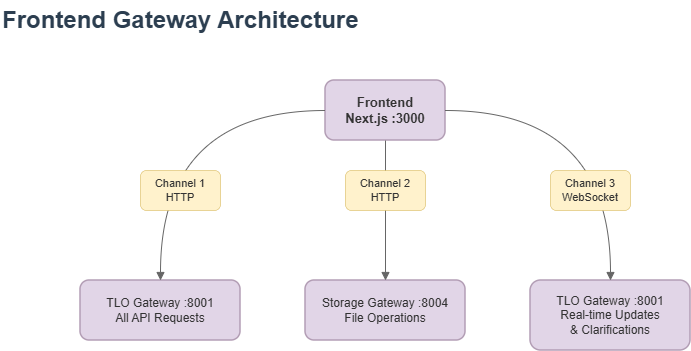
- Channel 1 (HTTP): Handles standard CRUD operations for prompts, templates, and history.
- Channel 2 (HTTP): Dedicated channel for high-bandwidth file uploads and object storage interactions.
- Channel 3 (WS): persistent connection for real-time progress updates and bidirectional reasoning loops.
Data Flow: Prompt Execution
The following diagram illustrates the complete end-to-end data flow, from user input and state management to real-time WebSocket updates and result rendering.
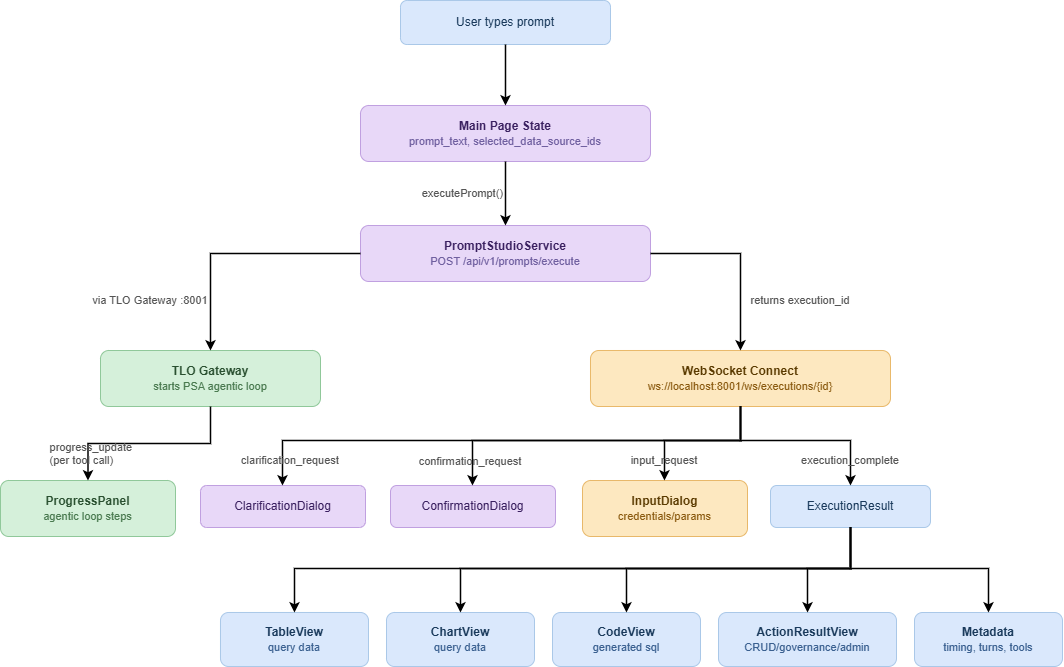
The system ensures that the frontend state is synchronized with the agentic loop progress in real-time.
API Service Layer
The PromptStudioService class abstracts the underlying API constants and provides a unified interface for data fetching. All requests are prefixed with /api/v1 and route through the TLO Gateway.
// Core Execution Methods
executePrompt(data: ExecutePromptRequest): Promise<ExecutePromptResponse>;
getExecutionStatus(id: number): Promise<PromptExecution>;

// History and Analytics
getPromptHistory(params: ListHistoryParams): Promise<PaginatedResponse<Item>>;
getQueryAnalytics(params: object): Promise<QueryAnalyticsResponse>;
Limitations and Constraints
- Single Active Connection: Clients are restricted to one active WebSocket connection per execution ID to ensure state consistency.
- Timeout Enforcement: Bidirectional requests (clarifications/confirmations) are subject to a server-enforced timeout (default 60s).
- Chart Complexity: ChartView is optimized for datasets under 1,000 rows; larger datasets are summarized before rendering to maintain client performance.