Model Studio API Reference
Page Outline
Welcome to the Model Studio API Reference. This documentation provides detailed information on the REST and WebSocket endpoints used to manage models, datasets, training runs, and production deployments.
API Structure
All endpoints are anchored under the base path /api/v1/models. The API is organized into several functional categories:
- Model CRUD & Dashboard: Fundamental lifecycle operations.
- Model Versions: Versioning and promotion logic.
- Dataset Integration: Linking models to data sources.
- Configuration & Settings: Fine-tuning training parameters.
- Training Orchestration: Triggering the AutoML pipeline.
- Training Metrics: Real-time progress and logs.
- Performance Metrics: Evaluation results and charts.
- Monitoring & Alerts: Post-deployment drift tracking.
- Registry & Collaborators: Access control and cataloging.
- Audit Logs: Detailed history of all model-related actions.
- Download & Test: Artifact export and testing tools.
- Custom Models: BYOM (Bring Your Own Model) specifics.
Detailed API Dataflow
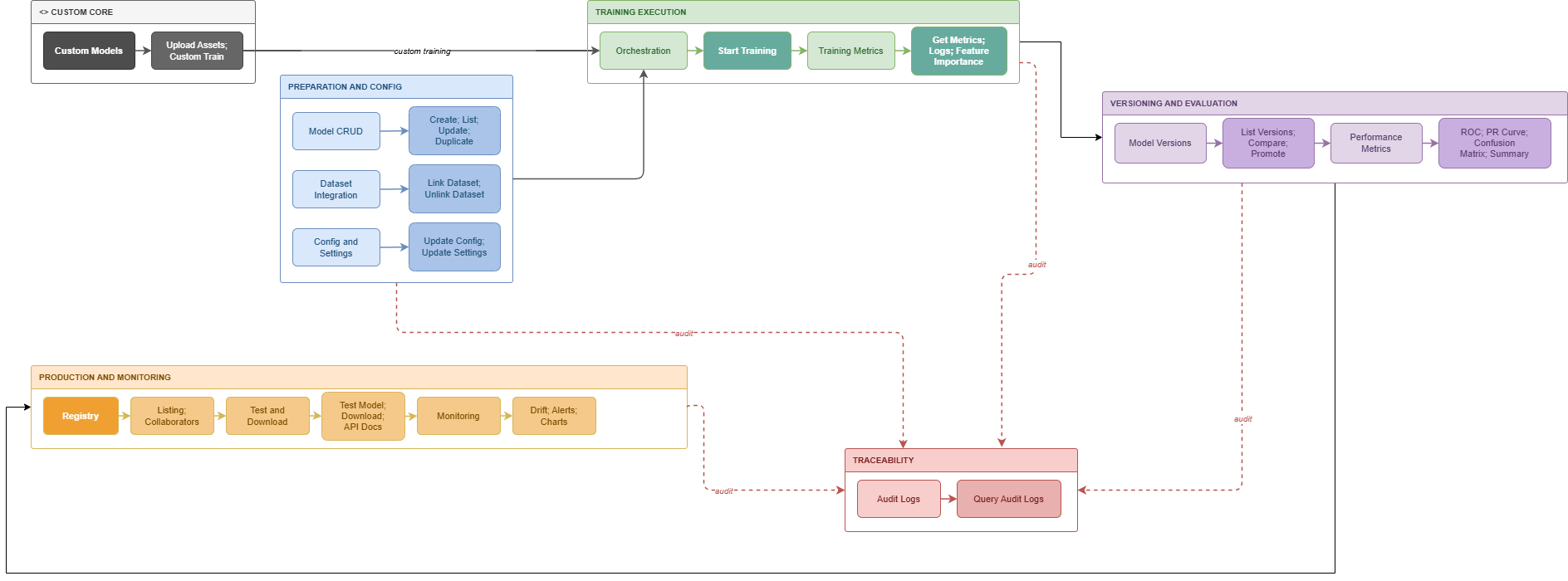
The following diagram maps the complete Model Studio lifecycle, showing how the different categories and specific endpoints interact:
The ML Lifecycle Explained
The Model Studio API is designed to orchestrate complex machine learning tasks in a logical, step-by-step progression:
1. Preparation & Config (Model CRUD & Dataset Integration)
Every operation begins with configuring the target model and linking it to a dataset. The Model CRUD endpoints handle creation and basic configuration, while Dataset Integration endpoints bind the model to the required data source.
2. Execution (Training Orchestration & Metrics)
Once configured, the Training Orchestration endpoints trigger the execution of the ML pipeline. During this phase, you can use the Training Metrics endpoints (REST or WebSocket) to receive live progress updates, performance metrics, and logs as the training runs.
3. Versioning & Evaluation
Upon completion, the model artifact becomes a tracked version via the Model Versions endpoints. You can then use Performance Metrics to review evaluation charts (like ROC curves and confusion matrices) and compare different versions to select the best performer.
4. Production & Monitoring (Deployment & Registry)
To make a model available for live use, it's managed via the Registry and subsequently deployed. Once deployed, the Monitoring endpoints track the live model's data drift and health to ensure ongoing accuracy.
Auxiliary Operations
- Audit Logs: Provides traceability for all operations across the lifecycle.
- Custom Models: For users bringing their own models (BYOM), skipping the standard AutoML pipeline but utilizing the registry and monitoring infrastructure.
Authentication
Authorization: Bearer <YOUR_JWT_TOKEN>
This API is for internal RiverGen use and technical integration partners. For high-level architecture, see the Model Studio Overview.